Restaurant operations • SOPs
Your restaurant's SOPs, recipes and menus, in one place.
Procedures live in a binder, recipe cards in a drawer and the menu in a file on one laptop. Gid keeps them in the app, each open to the right people, and answers the team's questions from them.
No contract. No commitment. No credit card.
Our job is to earn our place on your floor, not to lock you in.
Last updated September 24, 2026
Gid
Founders rate • Lifetime$29 $89 USD per location per month
- Tasks, schedule and team chat in one app
- Continuous training tuned to your menu
- Daily reports that surface what matters
- An AI assistant that knows your documents
- Your whole team in. Adding people never raises your bill.
First 250 worldwide • rate locked, no contract
Why SOPs go unread
An SOP nobody can find is not a standard
Most restaurants have written procedures. Few can find the current one during service.
Findability
The binder is in the office
The closing procedure is in a binder in the office. At midnight, nobody goes to get it.
Versions
Three copies, three versions
The recipe card on the line, the one in the drawer and the one in the owner's email no longer agree.
Access
Everything or nothing
A shared drive shows HR policies to everyone, or hides the prep lists from the people who need them.
Questions
The answer is on page 14
A new cook wants the par for the sauce. The answer exists, but asking a busy sous chef is faster.
Training
Procedures and training live apart
The training says one thing, the task says another, and the procedure is in a third place.
Change
Updates never reach the floor
A procedure changes and the team hears about it by accident, weeks later.
The SOP library
What belongs in a restaurant SOP library
A list to copy. Most restaurants already have half of it, spread across binders, drawers and inboxes.
Front of house
Service and the room
- The steps of service, from greeting to the bill.
- Reservations, seating and large parties.
- Cash handling, voids and the end-of-night checkout.
- Handling a complaint, and when to call the manager.
- Opening and closing the dining room.
Kitchen
Recipes and the line
- Standardized recipe cards for every dish.
- Build sheets and plating guides.
- Prep lists and par sheets by station.
- The allergen matrix, dish by dish.
- Holding temperatures, cooling, labelling and dating, against your local food code.
Bar
Pours and service
- The drink list with pours and garnish.
- House cocktail specs.
- Closing the bar and counting stock.
- The alcohol service rules that apply where you operate.
Management
Policies and safety
- HR policies and the employee handbook.
- Safety protocols, and what to do after an incident.
- Opening, closing, lockup and the cash.
- Deliveries and supplier procedures.
Where each document goes
Filed once, open to the right people
How the library above maps to Operations Knowledge in Gid, and who can open each part by default.
| Document | In Gid |
|---|---|
| Operations guides | Filed under Operations Guides, and open to everyone by default. |
| Recipe cards, build sheets, plating guides, prep lists, par sheets, the allergen matrix | Filed under Menus, each with its type, and open to everyone by default. |
| Server cheat sheets and training materials | Filed under Menus or Training Materials, and open to everyone by default. |
| Safety protocols | Filed under Safety Protocols, and open to everyone by default. |
| HR policies and financial documents | HR policies and financial documents start as managers only, unless you decide otherwise. |
| Anything sensitive | Set who can open each document: everyone, managers only, or executives only. |
How Gid uses them
Documents the team can read, ask about and follow
Upload what you have
Upload PDF, Word, Excel and CSV files, photos and videos. Gid suggests a category, and you keep the one that fits.
Read on the phone
Employees open the documents they are allowed to see in Operations Knowledge, view only, on their phone.
Ask Gid
Ask Gid a question and it answers from your documents. Archive a document and Gid stops using it for answers unless someone asks for it.
The procedure in the task
A task carries its step-by-step instructions, and can open the training that explains it.
How it works in Gid
From the binder to the work
The same standard, in the task, the training and the chat, without copying it by hand.
Step 1
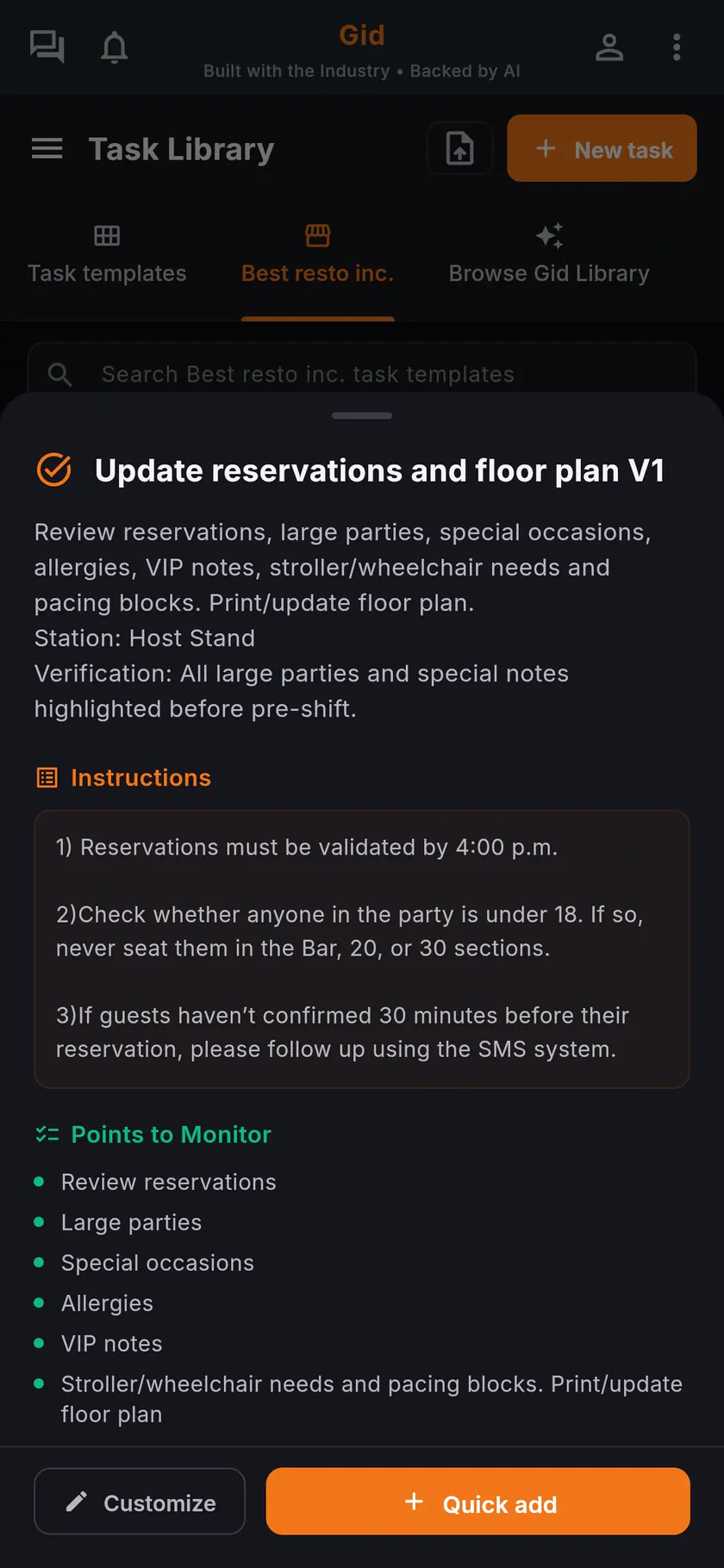
The standard inside the task
A task in the Task Library carries its instructions and the points to monitor, so the standard is on the phone of whoever does the work.
Step 2
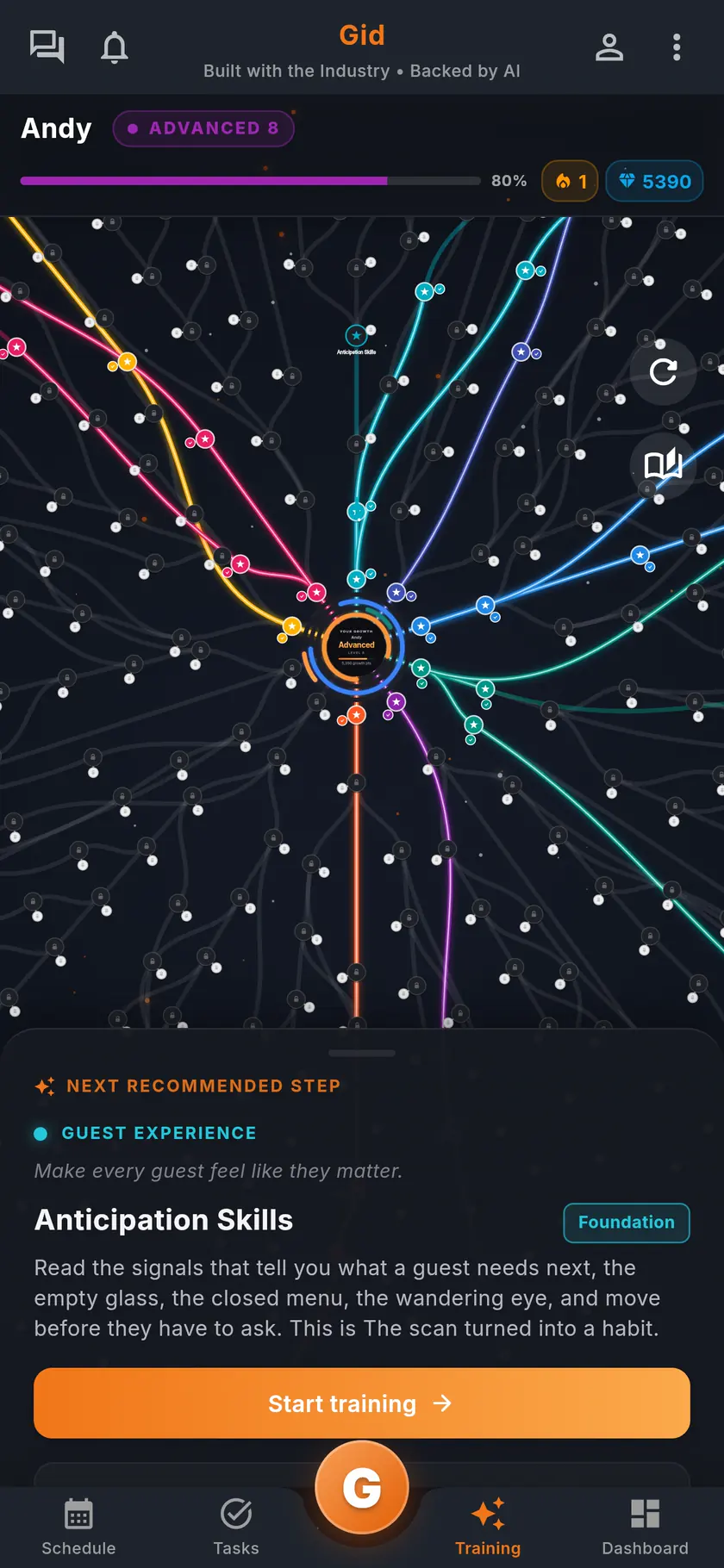
The standard in the training
Build a training from your menu, or write your own from the procedure, and assign it to the people who need it.
Step 3
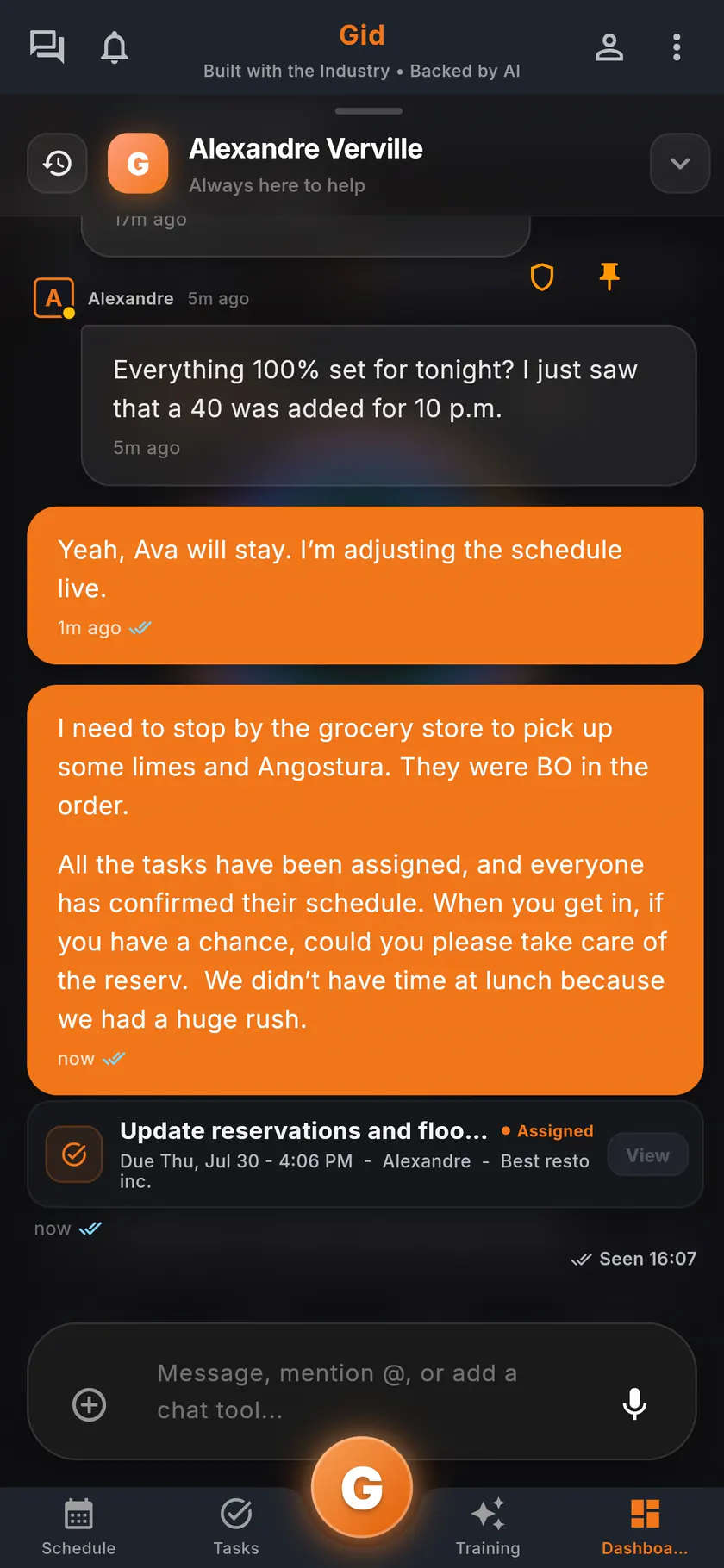
The change in the conversation
When a procedure changes, link the new document or the task into the team chat, so the team sees the new version.
A real change
A recipe change on a Monday, in Gid
An example of one change, made once and found where the work happens.
The change
A new recipe card
The chef changes the sauce and uploads the new recipe card under Menus. Everyone on the team can open it.
The line
The task points to it
The prep task for the sauce gets the new step in its instructions, so the morning cook follows the new version.
The question
Answered from the card
Mid-afternoon, a new cook asks Gid how much of the sauce to prep, and Gid answers from the par sheet the kitchen uploaded.
The stack you have today
Six apps that do not talk to each other, or one that does
Nothing here is a knock on any specific tool. It is what happens when the schedule, the tasks, the training, the chat, the documents and the guest reviews were never built to know about each other.
6 apps 6 logins 6 bills
- SchedulingThe week is posted, the swaps still happen by text.
- Tasks and checklistsA missed closing task shows up the next morning.
- Onboarding and trainingNew hires learn from whoever is on shift.
- Team chatShift talk buried between personal texts.
- Documents and menusRecipes and SOPs lost in folders and binders.
- Google reviewsReplies go out, the lesson never reaches the team.

Gid
One app on iOS, Android and the web
1 app 1 login 1 price
- Scheduling
- Tasks and checklists
- Onboarding and training
- Team chat
- Documents and menus
- Google reviewsReply drafts, recurring themes, lessons for the team
$29 USD per location per monthWhole team included
First 250 worldwide • rate locked, no contract
The honest part
When a binder is enough, and what Gid does not do yet
Not every restaurant needs an SOP app. Here is when yours does not.
A binder may be enough if
- Your whole team works in one room and the binder never leaves the shelf.
- Your procedures rarely change.
- Nobody new joins the team this year.
Limits of Gid today
- Gid keeps each document as you upload it. To change a Word file, edit it in Word and upload it again.
- Gid does not connect to wireless temperature probes or label printers today.
- Gid POS and Gid Reservations are listed as coming soon. They are not in your hands yet, and we will not bill you for them until they are.
- The free workspace brings you plus one helper. Bringing the full team means a paid location.
Questions, answered
What is a restaurant SOP app?
An app that keeps your standard operating procedures, recipes and menus where the team works, on the phone, instead of in a binder. In Gid they sit next to the tasks and the training that use them.
Can employees see our HR policies?
Only if you decide so. HR policies and financial documents start as managers only, and you can set any document to everyone, managers only, or executives only.
Can Gid answer questions from our SOPs?
Yes. Ask Gid a question and it answers from your documents. Archive a document and Gid stops using it for answers unless someone asks for it.
Can I store recipe cards and plating guides in Gid?
Yes. Upload them under Menus, where each document has a type: standardized recipe cards, build sheets, plating guides, prep lists, par sheets, the allergen matrix or server cheat sheets.
Which files can I upload?
PDF, Word, Excel and CSV files, photos and videos. A manager can also turn an uploaded schedule or task list into shifts and tasks.
What does the SOP library in Gid cost?
$29 USD per location per month at the Founders rate, $89 USD at the public rate, with your whole team included; adding people never raises your bill. The documents, the training, the tasks and the team chat are the same app, at the same price.
About this page
Who wrote it, and what Gid is
Written by the Gid team
Members of the Gid team owned and operated restaurants before building software. The SOP library list above is free to reuse. If your team needs something it misses, tell us at contact@gidai.ca.
What Gid is
One connected operations app for restaurant teams: scheduling, tasks, team chat, continuous training, onboarding, performance evaluations and an AI assistant grounded in your own documents. One price per location, whole team included.
Make every shift lighter.
Set up your workspace and try every part of Gid on your own. When you know it earns its place, your team rides in next.
No contract. No commitment. No credit card.