Restaurant operations • Checklists
Restaurant opening and closing checklists for every station.
Copy these opening and closing checklists for front of house, the kitchen, the bar and the manager, free. Gid then runs each one every day, with an owner, proof where it matters and a live view of what is done.
No contract. No commitment. No credit card.
Our job is to earn our place on your floor, not to lock you in.
Last updated September 23, 2026
Gid
Founders rate • Lifetime$29 $89 USD per location per month
- Tasks, schedule and team chat in one app
- Continuous training tuned to your menu
- Daily reports that surface what matters
- An AI assistant that knows your documents
- Your whole team in. Adding people never raises your bill.
First 250 worldwide • rate locked, no contract
Why checklists slip
The list exists. Nobody knows if today's was done
Every restaurant has an opening list and a closing list. The trouble is rarely the list itself.
The binder
Laminated by the dish pit
It was written once, pinned up, and now it is part of the wall. Nobody signs it, so nobody can tell whether it was followed on Tuesday.
The close
Done, according to whom?
A tick at the end of the night is not a clean fryer at open. When the morning finds the problem, the closer has gone home and the shift starts behind.
The person
It depends who is on
The real standard lives in the head of your best closer. On their night off, the standard takes the night off too.
Opening checklists
Before the doors open
Four lists, one per station. Copy them into your binder, change what does not fit your room, and give each one an owner.
Front of house
Dining room and host stand
- Walk the guest path from the street: sign lit, entrance swept, door glass and handles clean.
- Lights, music and room temperature set for the service.
- Tables set, level and wiped; chairs straight; menus clean, current and stocked.
- Restrooms clean, dry and stocked with soap, paper and towels.
- Side stations stocked: cutlery rolled, glassware polished, condiments filled.
- Host stand ready: reservations and large parties reviewed, sections set, allergy and occasion notes flagged.
- Open sign on and guest entrance unlocked, once the room is ready and not before.
Kitchen
Line, walk-in and prep
- Walk-in, reach-in and freezer temperatures read and logged against your local food code.
- Equipment on and up to temperature; hood fans running.
- Handwash sinks stocked with soap and towels; sanitizer mixed and tested.
- Deliveries checked against the invoice, dated and put away, oldest stock in front.
- Date labels checked; anything past its date thrown out and logged.
- Stations stocked to par from last night's prep list.
- Line check before service: holding temperatures, tastes, garnish, and the 86 list passed to the front.
Bar
Back bar and service well
- Ice bins filled, with the scoop stored outside the ice.
- Garnishes cut fresh, covered and dated; juices and syrups prepped.
- Back bar faced and stocked, speed rails full, backups counted.
- Beer and wine coolers at temperature; draft taps pouring clean.
- Glass washer running with detergent and sanitizer; glassware polished.
- Mats down; sinks and surfaces clean.
- Bar drawer counted; POS and printer working.
Manager
Cash, tech and the huddle
- Alarm off, doors unlocked, and a first walk-through of every area.
- Opening drawers counted and matched to the float.
- POS terminals signed in, printers loaded, kitchen screens and card readers working.
- Delivery tablets on and set to open, with 86'd items marked unavailable.
- Staffing checked against the schedule, and any callout covered before service.
- Pre-shift huddle: specials, the 86 list, allergens, sections, the reservation picture and one service focus.
Closing checklists
After the last table
A good close is a gift to the opener. The same four stations, in the order the night actually ends.
Front of house
Dining room and checkouts
- Every check settled and every table closed in the POS.
- Each server's sidework verified by the closing manager before their checkout.
- Tables cleared and sanitized; chairs up for the floor.
- Floors swept and mopped; trash and recycling out.
- Side stations restocked for the morning; condiments consolidated and covered.
- Restrooms cleaned and restocked, floors dry, lights off.
- Menus wiped; tomorrow's reservations and large parties checked.
Kitchen
Line breakdown and storage
- Food wrapped, labeled, dated and stored; nothing left open on the line.
- Walk-in temperatures logged; doors closed and latched.
- Equipment off and pilots safe; fryers covered or filtered on your schedule.
- Surfaces, cutting boards and slicers cleaned and sanitized.
- Dish area closed down: machine drained and cleaned, screens emptied.
- Floors swept and mopped, drains clear, trash out.
- Waste logged, and tomorrow's prep list written for the opener.
Bar
Service well and back bar
- Garnishes and juices covered, dated and refrigerated, or thrown out.
- Speed rails and back bar restocked; empties counted.
- Draft taps and pour spouts cleaned; mats soaking.
- Glass washer drained; glasses washed and stored.
- Sinks drained and wiped; ice bin emptied and wiped.
- Liquor secured and locked.
- Bar drawer counted, and tips declared under your policy.
Manager
Cash and lockup
- Every drawer counted and reconciled; the deposit prepared and in the safe.
- A last walk-through of each area against its closing list.
- Lights, music, heaters and cooking equipment off.
- Every door and window locked; walk-in and freezer latched.
- Alarm armed on the way out.
- A pass-down note for the opener: what ran out, what broke, what is owed to the morning.
How it works in Gid
From a list on the wall to a checklist that runs every day
Three steps, in the same app your team already opens for the schedule and the chat.
Step 1
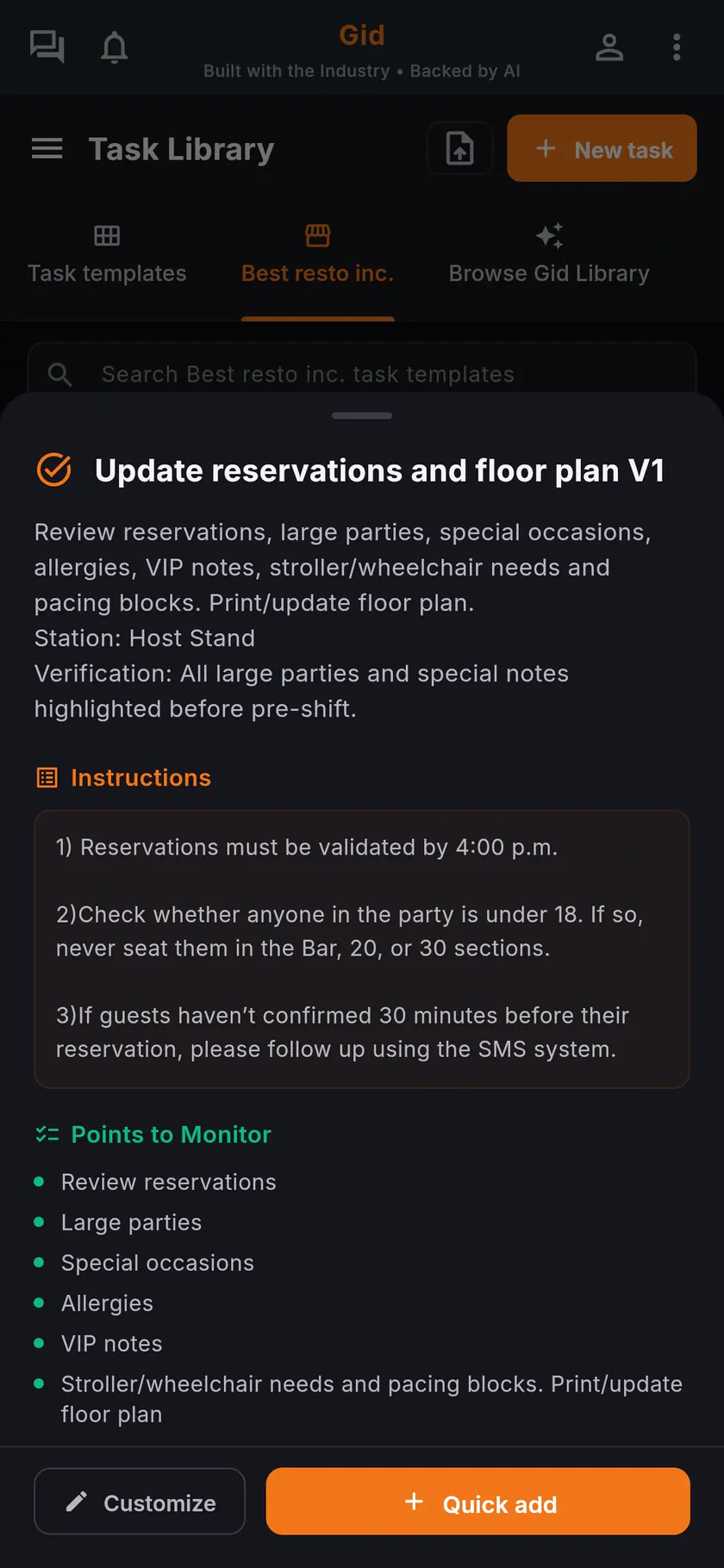
Start from a template or your own list
Browse Gid Library holds an Opening Tour and a Closing Tour that walk every area, plus shorter lists for the line, the dish area, the POS and the lockup. Activate one as it is, change it, or start from scratch with the lists above.
Step 2
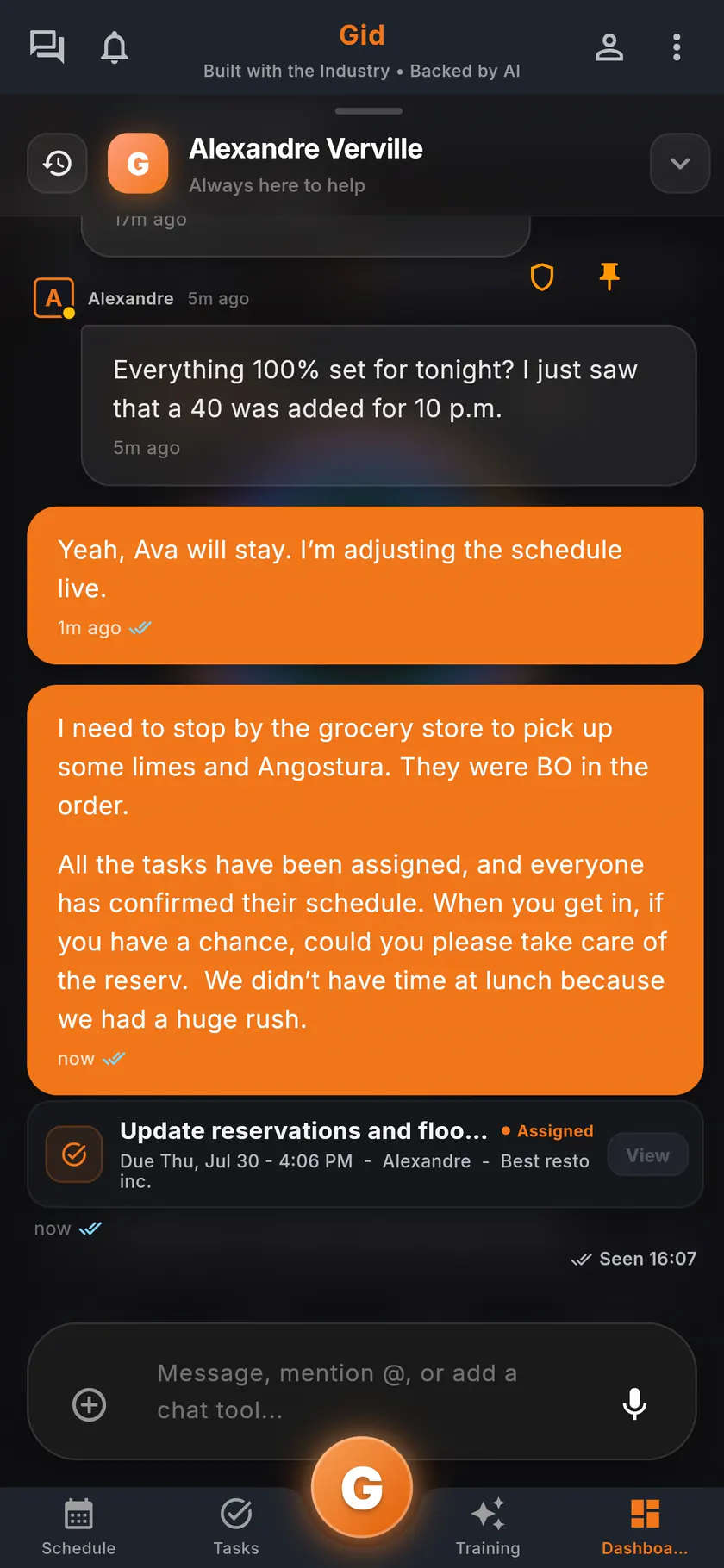
Make it repeat, give it an owner
Set the checklist to repeat every day, on the weekdays you choose, or once a month, and Gid creates each day's copy on its own. Assign it to the people who open or close, and share it in the chat when it needs a word.
Step 3
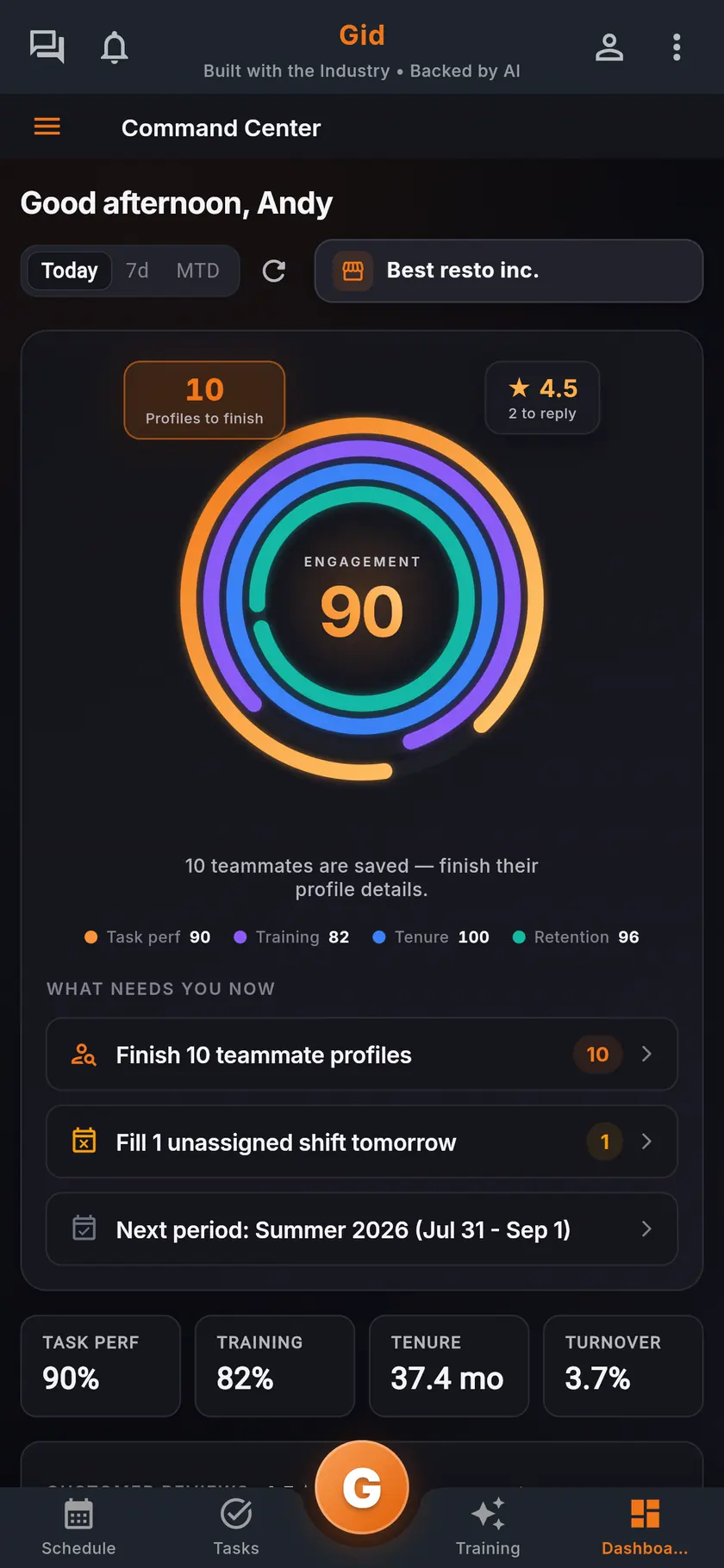
See what is done, and what is late
Everyone on the team can see the day's tasks, so the opener knows what the closer finished. A late checklist reminds the person it is assigned to and, after the delay you set, the manager too.
Proof, not a tick
What a checklist in Gid can ask for
Match the proof to the risk. Most items only need a tick; a few deserve more.
Each item ticked
A checklist task is done when its items are ticked, one by one, on the phone of the person doing them.
A photo or a reading
Ask for a photo of the clean line or the stocked bar, or a temperature reading for the walk-in, so the standard is the same whoever closes.
A sign-off where the risk is
The Closing Tour asks for a sign-off on the kitchen line, the cash and the lockup, so each of those carries a name.
A manager's review
A checklist can wait for a manager to validate it before it counts as done, which suits the lockup and the cash.
A real close
A Saturday close in Gid, start to finish
An example of the closing lists above on a busy night, built from the templates Gid ships.
Last tables
Servers check out against their sidework
Each closing server has the sidework checklist on their phone. The closing manager walks the section and signs off the checkout before the cash-out.
Kitchen down
The line closes with a photo
The closing cook ticks the line breakdown and adds a photo of the clean line. The dish area close-down runs beside it, on the dishwasher's phone.
Lockup
The manager signs the last walk-through
The Closing Tour walks every area, with sign-offs on the line, the cash and the lockup. In the morning the opener sees what was done, and by whom, before touching a switch.
The stack you have today
Six apps that do not talk to each other, or one that does
Nothing here is a knock on any specific tool. It is what happens when the schedule, the tasks, the training, the chat, the documents and the guest reviews were never built to know about each other.
6 apps 6 logins 6 bills
- SchedulingThe week is posted, the swaps still happen by text.
- Tasks and checklistsA missed closing task shows up the next morning.
- Onboarding and trainingNew hires learn from whoever is on shift.
- Team chatShift talk buried between personal texts.
- Documents and menusRecipes and SOPs lost in folders and binders.
- Google reviewsReplies go out, the lesson never reaches the team.

Gid
One app on iOS, Android and the web
1 app 1 login 1 price
- Scheduling
- Tasks and checklists
- Onboarding and training
- Team chat
- Documents and menus
- Google reviewsReply drafts, recurring themes, lessons for the team
$29 USD per location per monthWhole team included
First 250 worldwide • rate locked, no contract
The honest part
When paper is enough, and what Gid does not do yet
The lists above work on paper. Here is when that is all you need.
Keep it on paper if
- You open and close yourself, every day, alone. A laminated list on the wall is enough.
- Nobody else ever needs to know whether the list was done, or by whom.
- Your lists never change, and nobody new ever has to learn them.
Limits of Gid today
- These lists are a starting point, not a food safety standard. Check temperatures, date rules and cleaning steps against your local health authority.
- A person reads and enters each temperature. Gid does not connect to wireless temperature probes today.
- Gid POS and Gid Reservations are listed as coming soon. They are not in your hands yet, and we will not bill you for them until they are.
- The free workspace brings you plus one helper. Bringing the full team means a paid location.
Questions, answered
What should be on a restaurant opening checklist?
Four lists, one per station: the dining room and host stand, the kitchen line and its temperatures, the bar, and the manager's cash, tech and pre-shift huddle. Each item should be something a person can see and tick, not a reminder to be careful.
What should be on a restaurant closing checklist?
The same four stations, in the order the night ends: server checkouts and the dining room, the line breakdown and storage, the bar well, then the manager's cash and lockup. End with a pass-down note, so the opener knows what ran out and what broke.
How do I know the closing checklist was actually done?
Give each list an owner, and ask for proof only where the risk is: a photo of the clean line, a sign-off on the cash and the lockup. In Gid, a checklist can require a photo or a sign-off and can wait for a manager to validate it, and the opener sees who finished what.
Can Gid repeat a checklist every day on its own?
Yes. Set a checklist task to repeat every day, on the weekdays you choose, or once a month, and Gid creates each copy on its own. If one runs late, the person it is assigned to gets a reminder and, after the delay you set, the manager does too.
Are these checklists free to use?
Yes. Copy them, change them and pin them up; no account needed. To run them in Gid, create a free workspace, no card. It brings you plus one helper; the rest of the team rides on a paid location.
What does it cost to run checklists in Gid?
$29 USD per location per month at the Founders rate, $89 USD at the public rate, with your whole team included; adding people never raises your bill. The checklists, the schedule, the team chat and the training are the same app, at the same price.
About this page
Who wrote it, and what Gid is
Written by the Gid team
Members of the Gid team owned and operated restaurants before building software. These lists are free to reuse, and if something your room needs is missing, tell us at contact@gidai.ca.
What Gid is
One connected operations app for restaurant teams: scheduling, tasks, team chat, continuous training, onboarding, performance evaluations and an AI assistant grounded in your own documents. One price per location, whole team included.
Make every shift lighter.
Set up your workspace and try every part of Gid on your own. When you know it earns its place, your team rides in next.
No contract. No commitment. No credit card.