Restaurant operations • Tasks
Restaurant task management, with proof it was done.
Daily tasks slip when they live in someone's head. Gid gives every task an owner and a due time, asks for a photo, a reading or a sign-off when it matters, and reminds the right people before it is late.
No contract. No commitment. No credit card.
Our job is to earn our place on your floor, not to lock you in.
Last updated September 24, 2026
Gid
Founders rate • Lifetime$29 $89 USD per location per month
- Tasks, schedule and team chat in one app
- Continuous training tuned to your menu
- Daily reports that surface what matters
- An AI assistant that knows your documents
- Your whole team in. Adding people never raises your bill.
First 250 worldwide • rate locked, no contract
Why tasks slip
Everyone thought someone else did it
Tasks rarely fail because people do not care. They fail because nobody knew they were theirs.
Ownership
Nobody's name on it
Somebody should clean the ice machine is a task for nobody. On a busy night, nobody does it.
Memory
The routine lives in one head
The weekly and monthly jobs get done when the person who remembers them is working.
Proof
A tick is not proof
A checked box says someone was there. It does not say the walk-in was at temperature.
Timing
Late is found out tomorrow
A missed task shows up the next morning, when the opener finds it.
Standard
Done, but not to standard
The job was done, just not the way the manager meant, because the standard was never written down.
Hand-off
The task stays behind
When someone gives their work away for the evening, the tasks that came with it stay with the wrong person.
The task list
A restaurant task list, by rhythm
Three lists to copy, and the five things every task needs. Change what does not fit your restaurant.
Every day
The daily rhythm
- Line check before service: holding temperatures, tastes and garnish.
- Walk-in, reach-in and freezer temperatures logged.
- Side stations restocked, restrooms checked during service.
- Sanitizer buckets changed and tested.
- Closing sidework and the checkout.
Every week
The weekly jobs
- Deep clean of one kitchen area, on a rotation.
- Count of the key inventory items.
- Hood filters, drains and floor mats cleaned.
- Glassware and cutlery checked, chipped pieces removed.
- Order guide reviewed against next week's covers.
Every month
The monthly jobs
- Ice machine cleaned and sanitized.
- Fire extinguishers, first-aid kits and exits checked.
- Thermometers calibrated, door gaskets and refrigeration coils checked.
- Pest control log reviewed.
- Menu, prices and allergen information checked against the kitchen.
Every task
What a good task needs
- An owner: one person, not the team.
- A due time, and whether it repeats.
- The standard: what done looks like, in a line or two.
- Proof only where the risk is: a photo, a reading, a signature.
- Who follows up if it is late.
How Gid runs each task
Eight things every task needs, and how Gid handles each
The same list, run in the app your team already has on its phone.
| What it needs | In Gid |
|---|---|
| An owner | Every task has an assignee, a department and a priority. Smart Assign puts first the people working at that time in the task's role. |
| A due time that repeats | Set the due time, then repeat the task daily, weekly or monthly. Gid creates each copy on its own. |
| Tasks that follow the work | Attach tasks to a shift when you create it, and they go to the person working it. If the shift is given away or covered in the Shift Marketplace, its open tasks move to whoever takes it. |
| Proof where the risk is | Ask for a photo, before and after photos, a signature, notes, or a reading checked against its safe range. |
| A manager's review | A task can stay pending until a manager approves it. |
| A reminder before it is too late | A late task reminds the person it is assigned to and, after the delay you set, the manager too. |
| The whole team sees the day | Everyone on the team can see the day's tasks, and a task shared in the team chat carries its status with it. |
| The how-to, one tap away | Link a training to a task or a task template, and the task shows it as its linked training. |
How it works in Gid
From the Task Library to a finished day
Three views, one app, nothing copied from one to the other.
Step 1
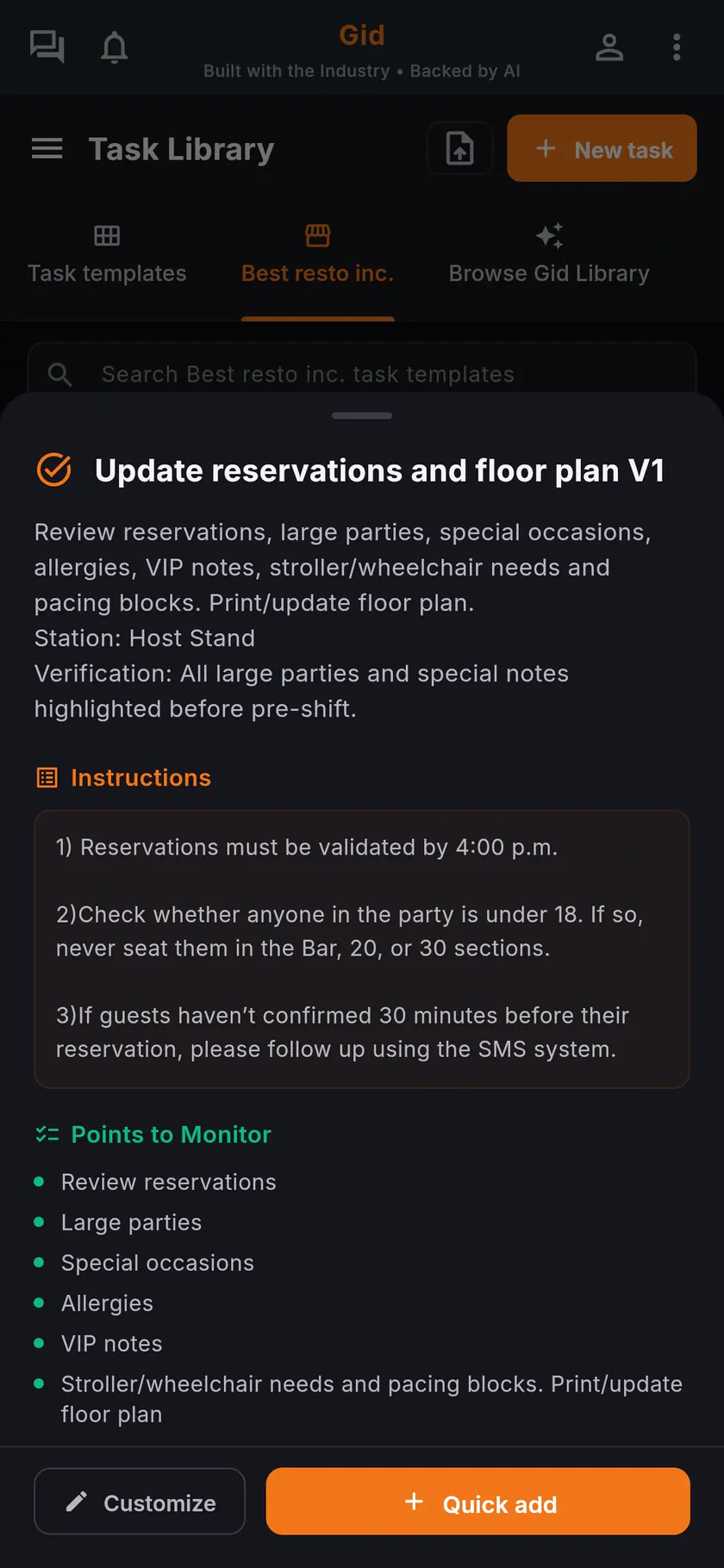
Start from the Task Library
Browse Gid Library for ready templates, or save your own with their instructions and the points to monitor, then add them to the day.
Step 2
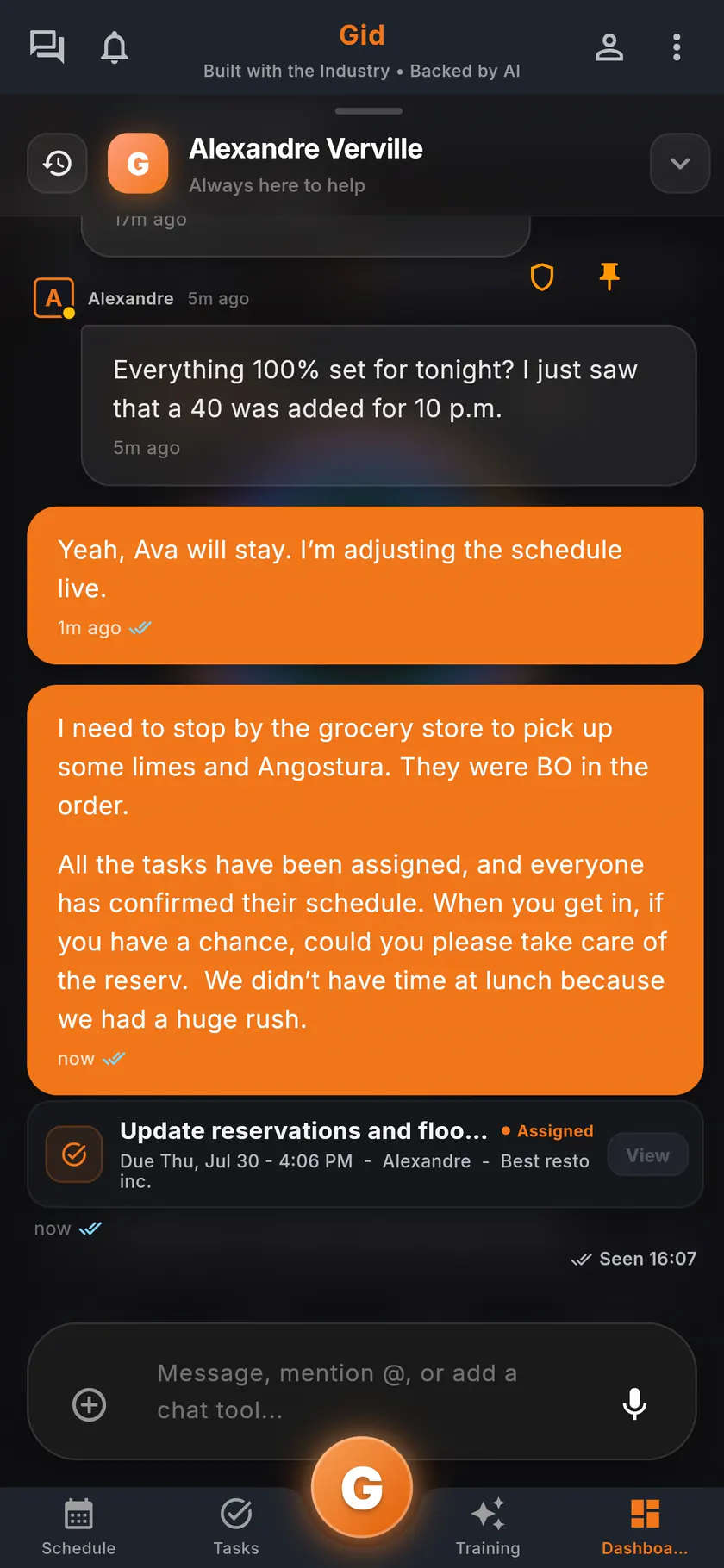
Talk about it where it lives
Share a task into the team chat and its status travels with it, so the reply and the work stay together.
Step 3
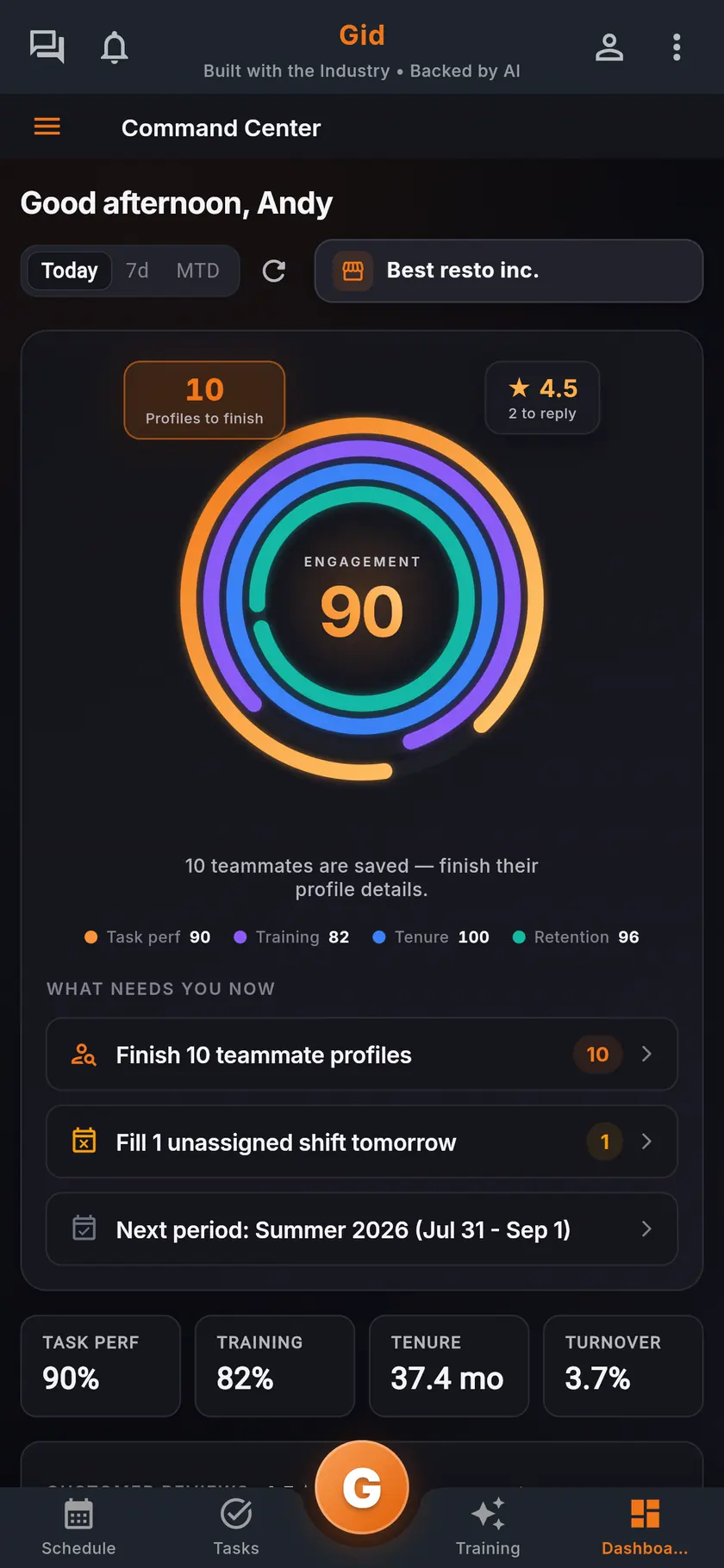
See where work slips
The command center shows the team's task performance, and owners get an analysis of completion patterns and where work slips.
A real day
A Friday in Gid, from open to close
An example of one day of tasks, followed by the app instead of by memory.
Morning
The opener's list is waiting
The opening cook sees the day's tasks on the phone: the temperature readings, the line check and the prep, each with its standard.
Afternoon
The work changes hands
A server gives away the evening in the Shift Marketplace. The sidework tasks attached to it move to the person who takes it.
Night
The late one gets caught
The ice machine cleaning is late. Gid reminds the closer, then the manager, before the lights go off.
The stack you have today
Six apps that do not talk to each other, or one that does
Nothing here is a knock on any specific tool. It is what happens when the schedule, the tasks, the training, the chat, the documents and the guest reviews were never built to know about each other.
6 apps 6 logins 6 bills
- SchedulingThe week is posted, the swaps still happen by text.
- Tasks and checklistsA missed closing task shows up the next morning.
- Onboarding and trainingNew hires learn from whoever is on shift.
- Team chatShift talk buried between personal texts.
- Documents and menusRecipes and SOPs lost in folders and binders.
- Google reviewsReplies go out, the lesson never reaches the team.

Gid
One app on iOS, Android and the web
1 app 1 login 1 price
- Scheduling
- Tasks and checklists
- Onboarding and training
- Team chat
- Documents and menus
- Google reviewsReply drafts, recurring themes, lessons for the team
$29 USD per location per monthWhole team included
First 250 worldwide • rate locked, no contract
The honest part
When a whiteboard is enough, and what Gid does not do yet
Not every restaurant needs a task app. Here is when yours does not.
A whiteboard may be enough if
- A few people run the whole restaurant and see each other all night.
- Your tasks never change and never need proof.
- Nobody new has joined in a year.
Limits of Gid today
- Gid does not connect to wireless temperature probes today. Readings are typed in, each with an instant check against its safe range.
- Gid POS and Gid Reservations are listed as coming soon. They are not in your hands yet, and we will not bill you for them until they are.
- The free workspace brings you plus one helper. Bringing the full team means a paid location.
Questions, answered
What is the best way to manage restaurant tasks?
Give every task one owner, a due time and a written standard, ask for proof only where the risk is, and follow up before it is late, not the next morning. The lists above are a place to start.
Can I assign restaurant tasks by role?
A task goes to a person, with its department. Smart Assign puts first the people working at that time in the task's role, and tasks attached to a shift go to the person working it.
Can a task require a photo or a temperature?
Yes. A task can ask for a photo, before and after photos, a signature, notes, or a reading checked against its safe range.
What happens when a task is late?
Gid reminds the person it is assigned to and, after the delay you set, the manager too.
Can a task repeat every day?
Yes. Repeat a task daily, weekly or monthly, and Gid creates each copy on its own.
What does task management in Gid cost?
$29 USD per location per month at the Founders rate, $89 USD at the public rate, with your whole team included; adding people never raises your bill. The tasks, the schedule, the team chat and the training are the same app, at the same price.
About this page
Who wrote it, and what Gid is
Written by the Gid team
Members of the Gid team owned and operated restaurants before building software. The task lists above are free to reuse. If your team needs something it misses, tell us at contact@gidai.ca.
What Gid is
One connected operations app for restaurant teams: scheduling, tasks, team chat, continuous training, onboarding, performance evaluations and an AI assistant grounded in your own documents. One price per location, whole team included.
Make every shift lighter.
Set up your workspace and try every part of Gid on your own. When you know it earns its place, your team rides in next.
No contract. No commitment. No credit card.