Restaurant scheduling

Less scheduling admin. More time to lead your team.

Availability, the schedule and shift changes in one app your whole team already has on their phone.

  • Availability
  • Schedules
  • Shift confirmations
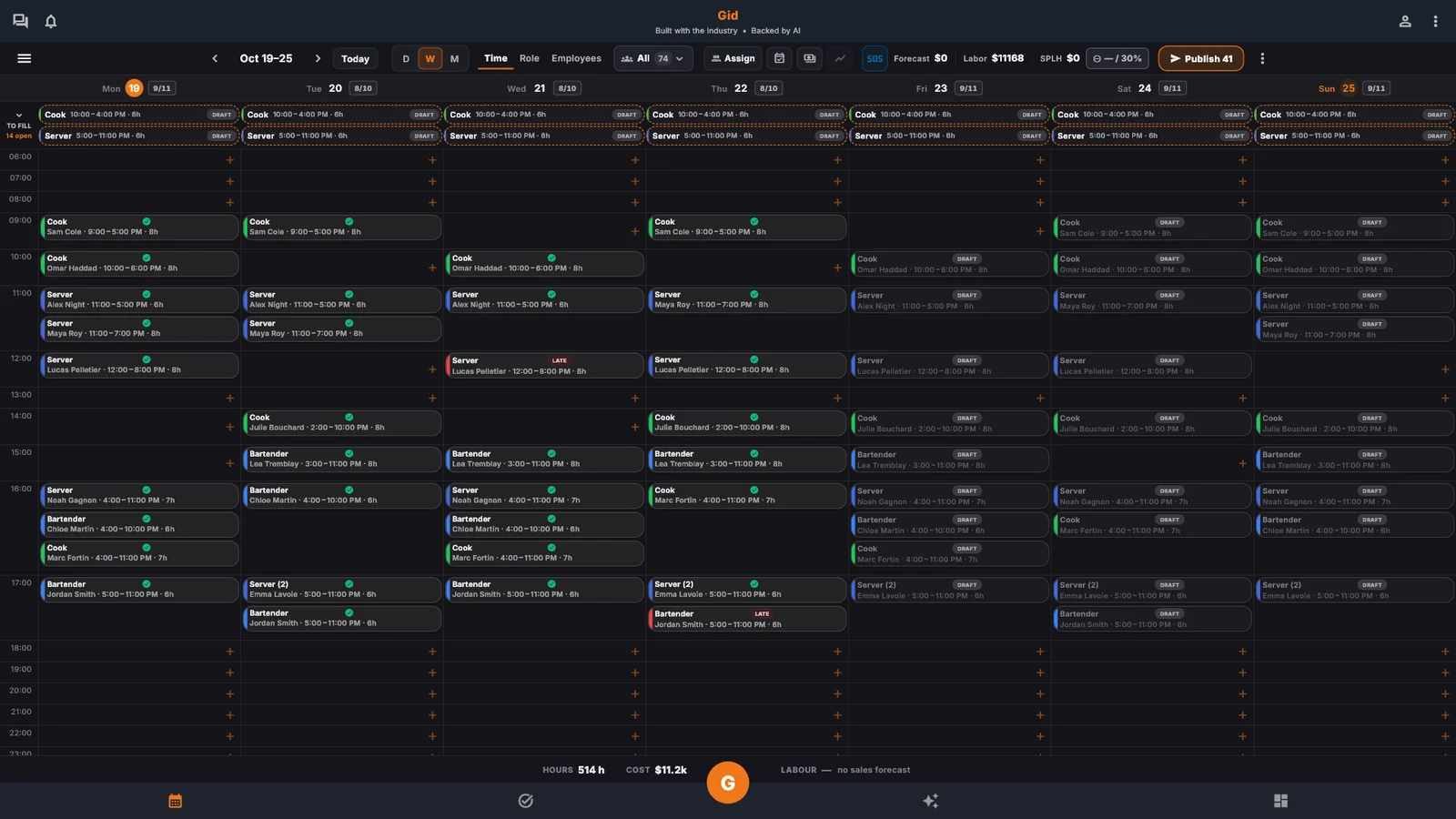
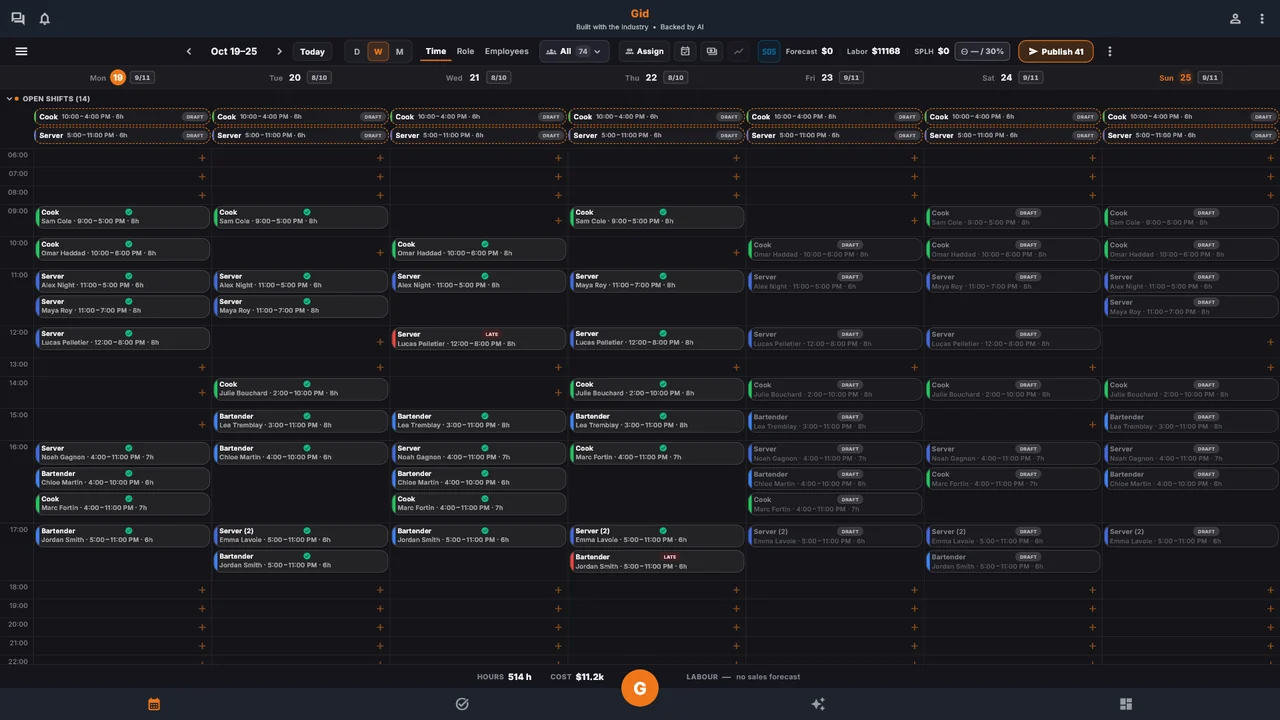
The Gid week schedule on a laptop, shifts laid out by time.
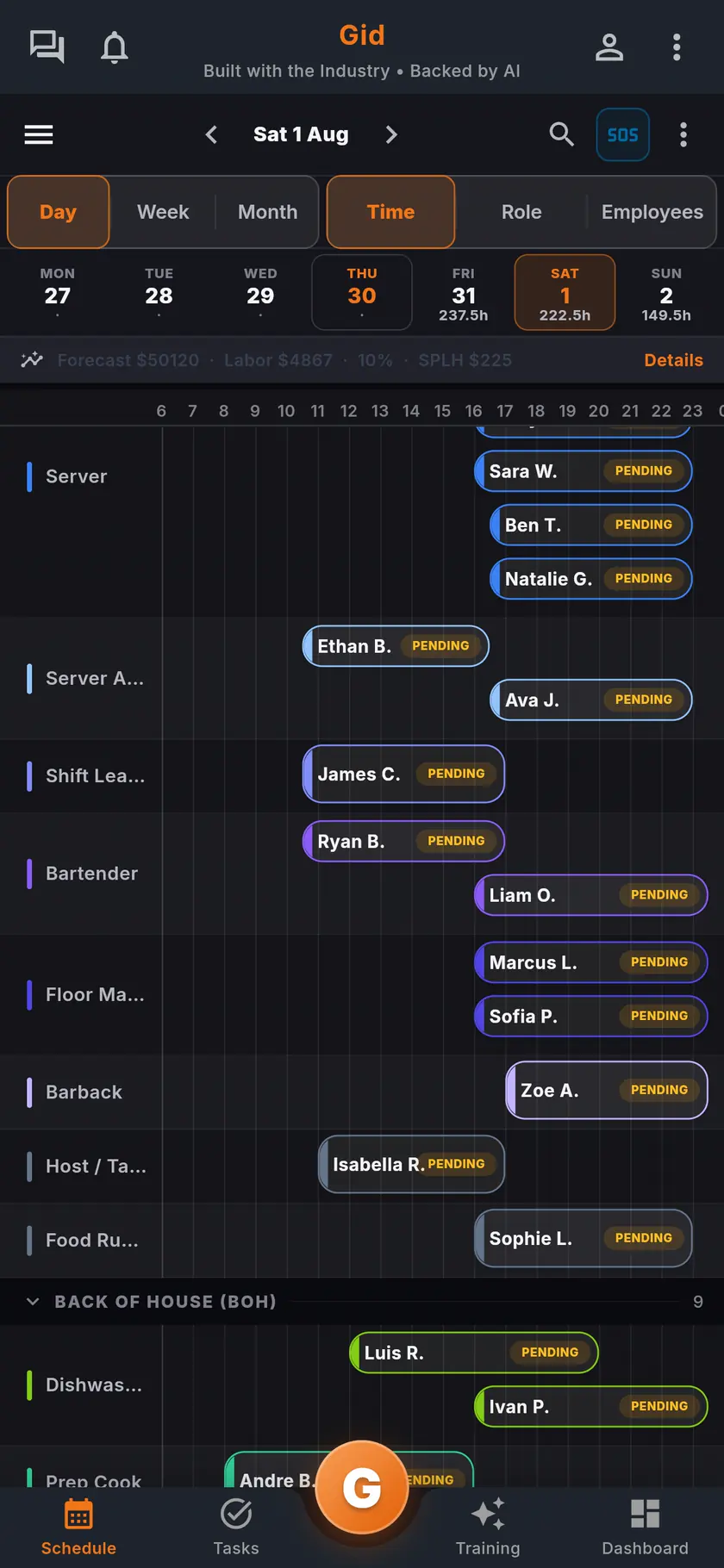
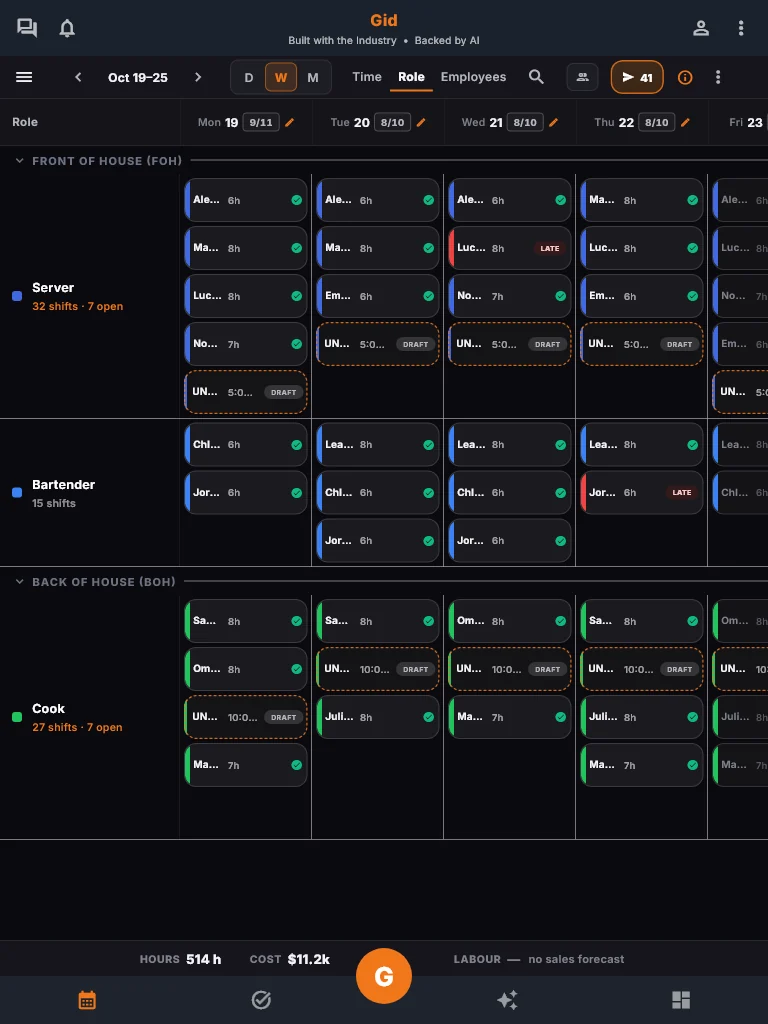
The Gid week schedule on a tablet, shifts grouped by role.
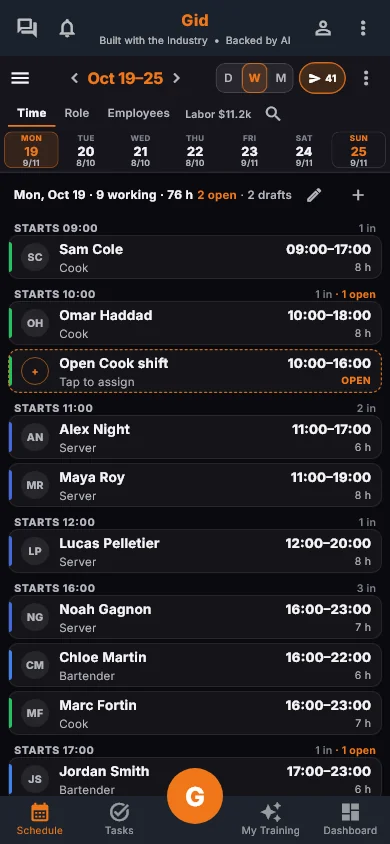
The Gid week schedule on a phone.
Real Gid screens, example data
Try Gid for free

No credit card. No commitment.

It’s on us to show you what Gid can do and earn its place in your daily operations.

The schedule

Build the week in minutes

Forecast, labor targets and confirmations in the same view. Publish it, and every teammate has it live in their pocket, never on a printed sheet.

  • Forecast and labor targets
  • Confirmed by each person, on the phone
  • Live in every pocket
The Gid week schedule on a desktop, by time, role or employee.

Availability

Availability before the schedule

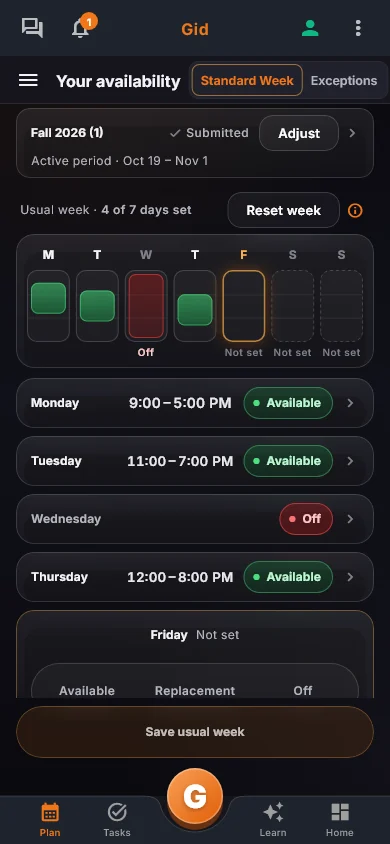
Each person sets a usual week once, marks the days that change, and answers when you open a new period. The schedule is then built on what the team can actually work.

  • A usual week, set once
  • Days that change, marked
  • One tap reminds the team
The Gid availability screen on a phone: a usual week with available and off days.

Shift changes

Callouts covered in the conversation

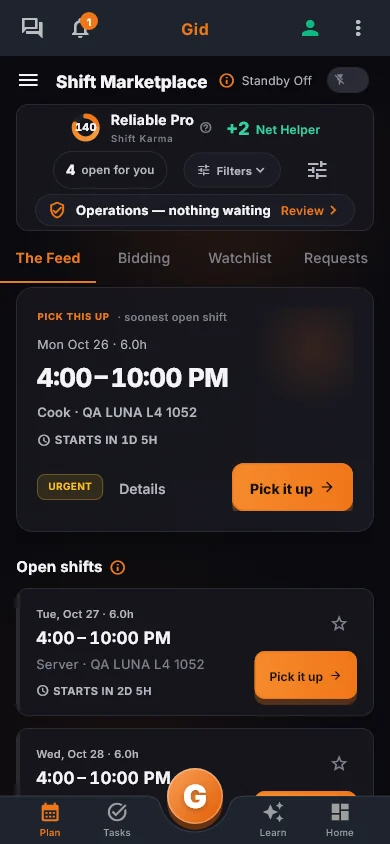
In the Shift Marketplace, a shift can be handed to a teammate, opened to the team, covered or picked up.

  • Hand off or open to the team
  • Gid asks the trained crew first
  • Pickups respect saved availability
The Gid Shift Marketplace on a phone, with an open shift to pick up.

Pricing

Gid

Founders rate • Lifetime

$29 $89 USD per location per month

Your whole team in. Adding people never raises your bill.

Try Gid for free

No credit card. No commitment.

First 250 worldwide • rate locked, no contract

Lock the Founders rate

Included for scheduling

  • Week by time, role or employee
  • Availability and time off before you build
  • Shift confirmations and open shifts to pick up
  • Hours and labor cost as you build
  • On iOS, Android and the web

Also in every Gid plan

  • Tasks and checklists
  • Training
  • Onboarding
  • Team chat and Ask Gid
  • Gid Kitchen
  • Google reviews

Gid POS and Gid Reservations are separate add-ons.

Questions, answered

How does Gid handle last-minute callouts and shift swaps?

In the Shift Marketplace, a shift can be handed to a teammate, opened to the team, covered or picked up. The conversation about a change happens in the team chat that already carries the shift and the tasks around it, not in a separate app.

What happens when I publish the schedule?

The moment you publish, it is live in every teammate's pocket: the same schedule, the same version, on iOS, Android or the web. No printed sheet, and no separate thread to keep in sync by hand.

Can my team see the schedule without using a computer?

Yes. Gid runs on iOS, Android and the web, so the schedule, the tasks and the training live in the pocket of everyone on shift. Nothing depends on the office computer.

Does Gid replace my group chat and my task list too?

Yes, they are the same app. Tasks, shifts and every ops detail travel right inside the conversation, and the whole team sees what is done and what is next, live from the floor.

What does scheduling on Gid cost?

$29 USD per location per month at the Founders rate, $89 USD at the public rate, with your whole team included; adding people never raises your bill. Create a free workspace first, no card, and try it on your own schedule.

How do restaurant employees set their availability in Gid?

In My Availability, each person saves a usual week, every day Available, Off or Replacement only, then adds time off and exceptions for the dates that change.

What if someone's availability changes for one week?

They add an exception for those dates in Time off and exceptions, and mark them unavailable or available. Their usual week does not change.

Can I see who has not given their availability?

Yes. The Availability Cockpit shows who has given availability for the period and who has not, and one tap reminds the team, at most once a day.

Does Gid stop me from scheduling someone who is unavailable?

When you assign a shift, Smart assign leaves out people who are not available that day, and an open shift cannot be picked up outside someone's saved availability. A manager's override for a day is kept, with its note, in the activity history.

Can staff ask for more hours?

Each person sets the hours and the days they want each week, and can pick up open shifts in the Shift Marketplace within their availability and weekly hours.

What does availability in Gid cost?

$29 USD per location per month at the Founders rate, $89 USD at the public rate, with your whole team included; adding people never raises your bill. Availability, the schedule, the tasks and the team chat are the same app, at the same price.

The full guide

Everything on this topic, in detail.

Everything you need to know before you build a schedule

Six fast answers

No demo required to understand what you are looking at. Six questions, six straight answers.

Price and next step

$29 USD per location, whole team in

The Founders rate is $29 USD per location per month, $89 public; adding people never raises the bill. Try a free workspace first, no card.

The problem

A schedule that lives alone

The shifts are in one app, the group chat is personal texts, the tasks are on a whiteboard, and the training is a binder nobody opens on a Tuesday. Six places to update, six places to miss something.

In a real shift

Forecast, labor targets and confirmations, one view

Gid's schedule manager is built for callouts and last-minute coverage. In the Shift Marketplace, a shift can be handed to a teammate, opened to the team, covered or picked up. The chat that already has the schedule and the tasks handles the conversation around it.

What you see

One phone, the whole floor

This week's shifts, the labor target, the team chat with today's tasks inside it, and a training session that takes about five minutes. Nothing lives in a tab you have to remember to open.

Why one app, not a stack

Managers get one system instead of six

The schedule is linked to the tasks, tasks can be sent in the chat, the chat knows the shift, and training and onboarding sit in the same app, on iOS, Android and the web.

What you can count on

Live in every teammate's pocket

The moment you publish, it is live in every teammate's pocket: the same schedule, the same version, on iOS, Android or the web.

This week's schedule, done in minutes

How it works

Three views, the same app, no export in between.

Step 1

The Gid week schedule on a phone, with the forecast and labor target above the shifts.

Build the week

Forecast, labor targets and confirmations in the same view. Publish it, and every teammate has it live in their pocket, never on a printed sheet.

Step 2

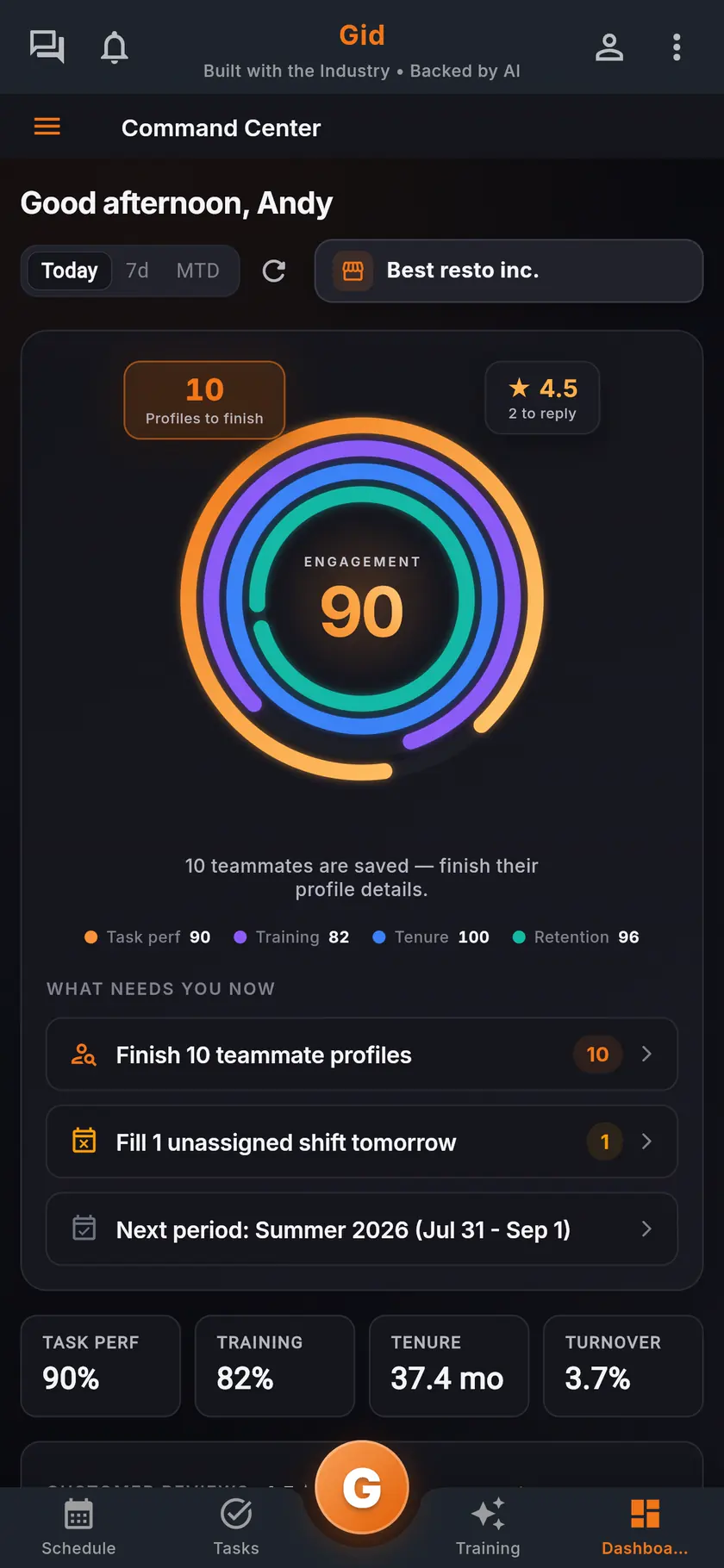
The Gid command center on a phone: team health, labor and the reviews waiting on you, all in one screen.

Watch what needs you

Team health, labor and the reviews waiting on you, in one glance, so you fix what matters first before it becomes a fire during service.

Step 3

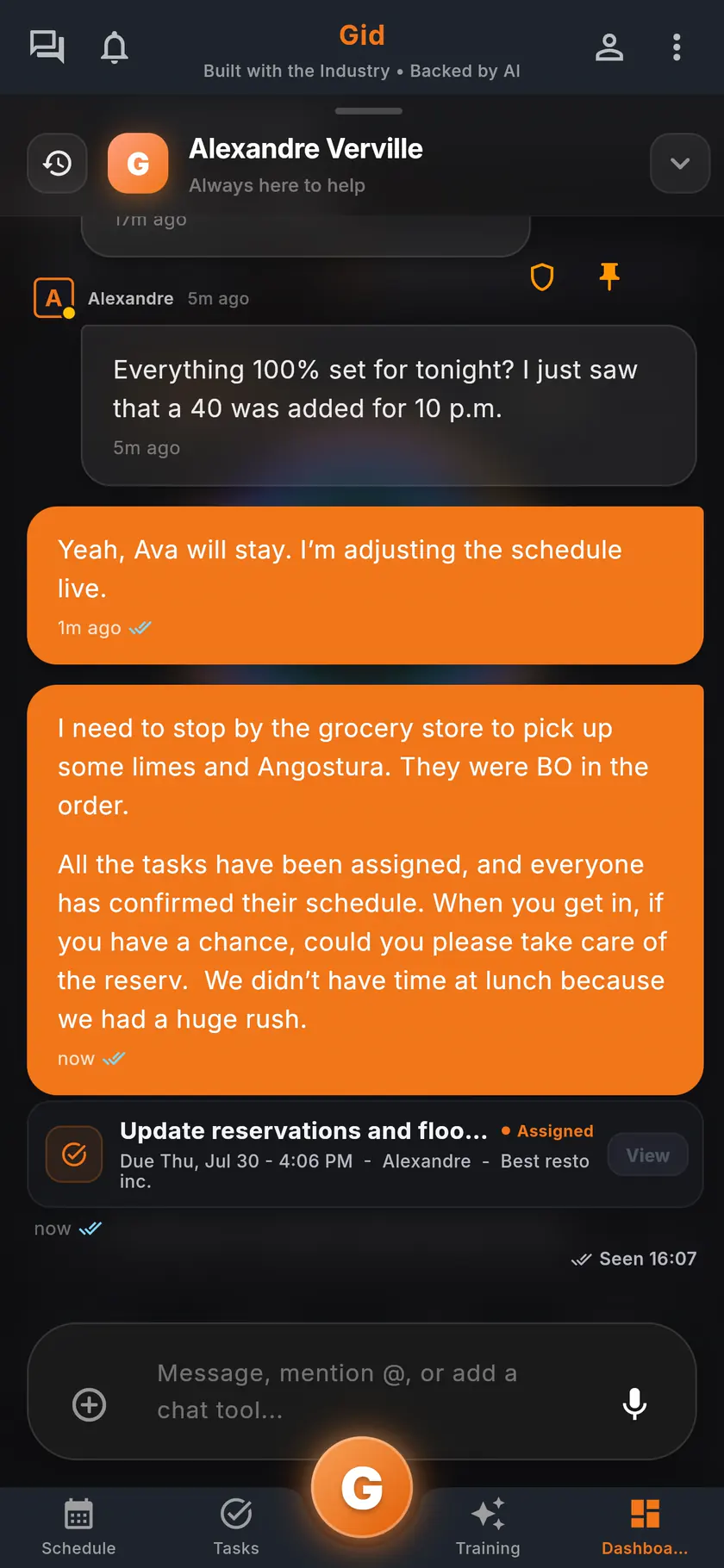
The Gid team chat on a phone, with a task shared straight into the conversation.

Handle it in the chat

A callout, a handoff, a task, sent straight into the conversation the team already has open. Nothing gets confirmed in a side channel nobody else can see.

Availability, confirmations and publishing, explained

Under the hood

The three moving parts of a real week, and how Gid keeps them in one place.

Callouts, handoffs and coverage

In the Shift Marketplace, a shift can be handed to a teammate, opened to the team, covered or picked up.

Confirmations happen where the team already is

Shifts and tasks travel inside the team chat, so a handoff or a callout gets resolved in the conversation the team already has open, not in a separate inbox.

Publish once, live everywhere

The moment you publish, it is the same schedule in every pocket: iOS, Android or the web. Nothing depends on the office computer.

A Friday callout, in Gid

A real shift

An example of one afternoon, from the callout to a covered dinner service.

The callout

The server asks Gid, not the group chat

A server who cannot make the dinner shift opens it in Gid and taps Find me a cover. Gid asks the trained crew first, then widens it to the whole team.

The pickup

Covered within the rules

A teammate picks it up in the Shift Marketplace, where an open shift cannot be picked up outside someone's saved availability, over their weekly hours, or over approved time off. The manager confirms whoever steps in.

Dinner service

The work follows the shift

Its open tasks move to whoever takes it, and the updated schedule is the same in every pocket, on iOS, Android or the web.

The stack you have today

The stack you have today

Six apps that do not talk to each other, or one that does

Nothing here is a knock on any specific tool. It is what happens when the schedule, the tasks, the training, the chat, the documents and the guest reviews were never built to know about each other.

6 apps 6 logins 6 bills

  • SchedulingThe week is posted, the swaps still happen by text.
  • Tasks and checklistsA missed closing task shows up the next morning.
  • Onboarding and trainingNew hires learn from whoever is on shift.
  • Team chatShift talk buried between personal texts.
  • Documents and menusRecipes and SOPs lost in folders and binders.
  • Google reviewsReplies go out, the lesson never reaches the team.

Gid

One app on iOS, Android and the web

1 app 1 login 1 price

  • Scheduling
  • Tasks and checklists
  • Onboarding and training
  • Team chat
  • Documents and menus
  • Google reviewsReply drafts, recurring themes, lessons for the team
Founders rate • Lifetime

$29 USD per location per monthWhole team included

First 250 worldwide • rate locked, no contract

Try Gid for free

Restaurant staff availability, before the schedule.

Restaurant operations • Availability

Each person sets a usual week once, marks the days that change, and answers when you open a new period. The schedule is then built on what the team can actually work.

Why availability goes wrong

The schedule is only as good as the availability behind it

Most scheduling mistakes start before the schedule: an availability nobody wrote down, or wrote down in several places at once.

Texts

Availability lives in texts

One person texts, another tells you at the pass, a third writes it on the sheet in the break room.

Stale

Last semester's availability

A server's classes changed in January. The schedule still thinks they are free on Tuesdays.

Deadlines

Answers arrive after the schedule

Half the team answers after the week is built, and the schedule is rebuilt twice.

Hours

Too many hours, or too few

One person wants thirty hours and gets fifteen, another wants twenty and gets forty. Both start looking elsewhere.

Time off

Days off get lost

A day off asked for in March is forgotten by May, and someone is scheduled on the day of a wedding.

Cover

Covering a gap means calling everyone

When someone calls out, the manager calls down the list without knowing who is actually free.

The availability form

What to ask every employee about availability

Four blocks to copy into your own form, or to ask out loud at the next team meeting.

Usual week

The pattern

  • For each day of the week: available, off, or available only to replace someone.
  • The hours they can work on the days they are available.
  • Days they would rather not open, or rather not close.
  • When the pattern changes: a new school term, a second job, childcare.

Hours

How much they want to work

  • The hours they want each week, and the most they can take.
  • How many days a week they want to work.
  • Whether they want extra work when it opens up.

Time off

The days that change

  • Specific days off, asked for with the dates, as early as possible.
  • Usually-off days when they are free after all.
  • A deadline for requests, so the schedule is not rebuilt.

Before each schedule

The period

  • Open a period for the weeks you are about to schedule, with a deadline.
  • Ask everyone to confirm or update their availability before the deadline.
  • Follow up with the people who have not answered, before you build.

How Gid collects it

Eight things availability needs, and how Gid handles each

The same form, run in the app your team already has on its phone.

What staff availability needs, and how Gid provides it.
What it needs In Gid
A usual week, set once Each person saves a usual week: every day Available, Off or Replacement only, with the hours they can work.
The hours each person wants They set the hours and the days they want each week, ideal and maximum, and the manager is flagged when a week goes over the maximum.
Days off and exceptions In Time off and exceptions, they pick the dates, mark them unavailable or available, and submit.
An answer before each schedule When a manager opens a scheduling period, each person submits availability for it before its deadline, starting from their usual week.
Knowing who has not answered The Availability Cockpit shows who has given availability for the period and who has not, and one tap reminds the team, at most once a day.
A manager's correction A manager can override one person's availability for a day, with a note kept in the activity history.
A schedule that respects it When you assign a shift, Smart assign leaves out people with the wrong role or who are not available that day.
Extra work for the right people An open shift in the Shift Marketplace cannot be picked up outside someone's saved availability, over their weekly hours, or over approved time off.

How it works in Gid

Availability first, then the week

Three views, one app, nothing retyped from a sheet.

Step 1

Open the next period early

The command center shows the next scheduling period, so availability is collected before the week is built, not after.

Step 2

Build on what the team can work

Build the week with availability already behind it. Once it is published, each person confirms their own shifts on the phone.

Step 3

Cover a gap in the conversation

When someone calls out, open the shift in the schedule and start a discussion with the people it concerns.

A real period

The summer schedule, in Gid

An example of one scheduling period, from the first question to the published week.

Two weeks before

The period opens

The manager opens the summer period with a deadline. Each person starts from their usual week and marks the days that change.

The deadline

Nobody is chased by text

The Availability Cockpit shows three people without an answer. One tap reminds the team, and two of them answer that evening.

The build

The week fits the team

Smart assign suggests people with the right role who are available. A server who asked for fewer hours is not pushed over their maximum without the manager knowing.

The honest part

When a sheet on the wall is enough

Not every restaurant needs an availability tool. Here is when yours does not.

A sheet on the wall may be enough if

  • Your team is small and works the same days every week.
  • Nobody's availability changes during the year.
  • You build every schedule with the whole team in the room.

Who wrote it, and what Gid is

About this page

Written by the Gid team

Members of the Gid team owned and operated restaurants before building software. This page describes the schedule as it works in the app today. If your week needs something it misses, tell us at contact@gidai.ca.

What Gid is

One connected operations app for restaurant teams: scheduling, shift confirmations, tasks, team chat, continuous training, onboarding, performance evaluations and an AI assistant grounded in your own documents. One price per location, whole team included.

Make every shift lighter.

Set up your workspace and try every part of Gid on your own. When you know it earns its place, your team rides in next.

No credit card. No commitment.

It’s on us to show you what Gid can do and earn its place in your daily operations.

Last updated October 25, 2026