Restaurant operations • Server training
Server training for restaurants, on every server's phone.
Servers learn best in short sessions, close to the floor. Gid turns your menu and your standards into training on the phone, assigns it by department or by person, and shows you who has finished.
No contract. No commitment. No credit card.
Our job is to earn our place on your floor, not to lock you in.
Last updated September 24, 2026
Gid
Founders rate • Lifetime$29 $89 USD per location per month
- Tasks, schedule and team chat in one app
- Continuous training tuned to your menu
- Daily reports that surface what matters
- An AI assistant that knows your documents
- Your whole team in. Adding people never raises your bill.
First 250 worldwide • rate locked, no contract
Why server training slips
Most servers are trained by whoever is working that night
Shadowing works when the trainer is great and the night is quiet. Neither is guaranteed.
Consistency
Every trainer teaches it differently
One server learns to pre-bus, another learns to wait. The guest gets whichever habit came with the trainer.
Menu
The menu changes, the training does not
A new special lands on Friday. The servers who were off on Thursday learn it from the guest.
Time
No hour to spare between services
A binder asks for an hour nobody has. Training that does not fit a phone and a few quiet minutes does not happen.
Visibility
Nobody knows who is ready
The manager cannot tell who has learned the wine list and who is guessing, until a guest asks.
Allergens
The riskiest question has no script
Every server has to answer an allergy question with confidence, and most learned the answer by ear.
Growth
Good servers stop growing
Once the basics are in, nothing tells an experienced server what to learn next.
The server training plan
Two weeks, from the first walk of the room to a section alone
Four blocks to copy into your own plan. Change what does not fit your room, and give each block a trainer.
Days 1 to 3
The room and the steps of service
- Walk the room: table numbers, sections, stations and the path from the kitchen.
- Greet within a minute of seating; water and the first order in your house order.
- Order entry on the POS, with modifiers, allergy notes and courses.
- Check-backs, clearing, pre-bussing and presenting the bill.
- Shadow a full service, then run two tables with the trainer beside you.
Days 4 to 7
The menu, dish by dish
- Every dish: what it is, how it is made and how it is plated.
- The allergens and dietary flags of each dish, and what the kitchen can change.
- The two or three questions guests ask about each dish, and the answers.
- Specials and the 86 list: where to find them before each service.
- Taste the menu with the kitchen, and describe each dish in one sentence.
Days 8 to 10
Drinks and selling
- The drink list, the pours and the house cocktails.
- Pairings for your best-selling dishes.
- Describing a special so a guest wants it, without pressure.
- The alcohol service rules that apply where you operate, and when to stop serving.
Days 11 to 14
A section alone
- A full section with the trainer as backup, then alone.
- Handling a complaint: listen, apologize, fix it, tell the manager.
- Closing sidework and the checkout with the closing manager.
- A short check-in with the manager: what is solid, what to practise next.
Three ways to start
Build the training from what you already have
Every training in Gid starts one of three ways, from the Training Creator.
From a menu
Four focused trainings from one menu
From a menu, Gid builds four focused front-of-house trainings for one verified menu version, as drafts you review before your team sees them.
From a template
Start from the Gid Library
Start from a Gid Library template or from one of your own saved trainings, and make it yours.
From scratch
Write your own standard
Add content blocks, write the lesson and set a quiz: your steps of service, your wine list, your way.
Assign it, then see who is ready
Who gets it, when it is due, and who has finished
By department or by person
Send a training to a department, such as front of house, or to specific people.
By a date, or by a day on the job
Make it due by a set date, or by a day on the job for a new hire, such as their third day.
A roster, not a guess
You see who has completed it, who is in progress, who has not started and who is overdue.
Real guests as examples
Link a Google review to a training as a real example. The learner sees the stars and the comment, never the reviewer's name.
How it works in Gid
The server learns on the phone, the manager sees the roster
Three views, one app, nothing to print.
Step 1
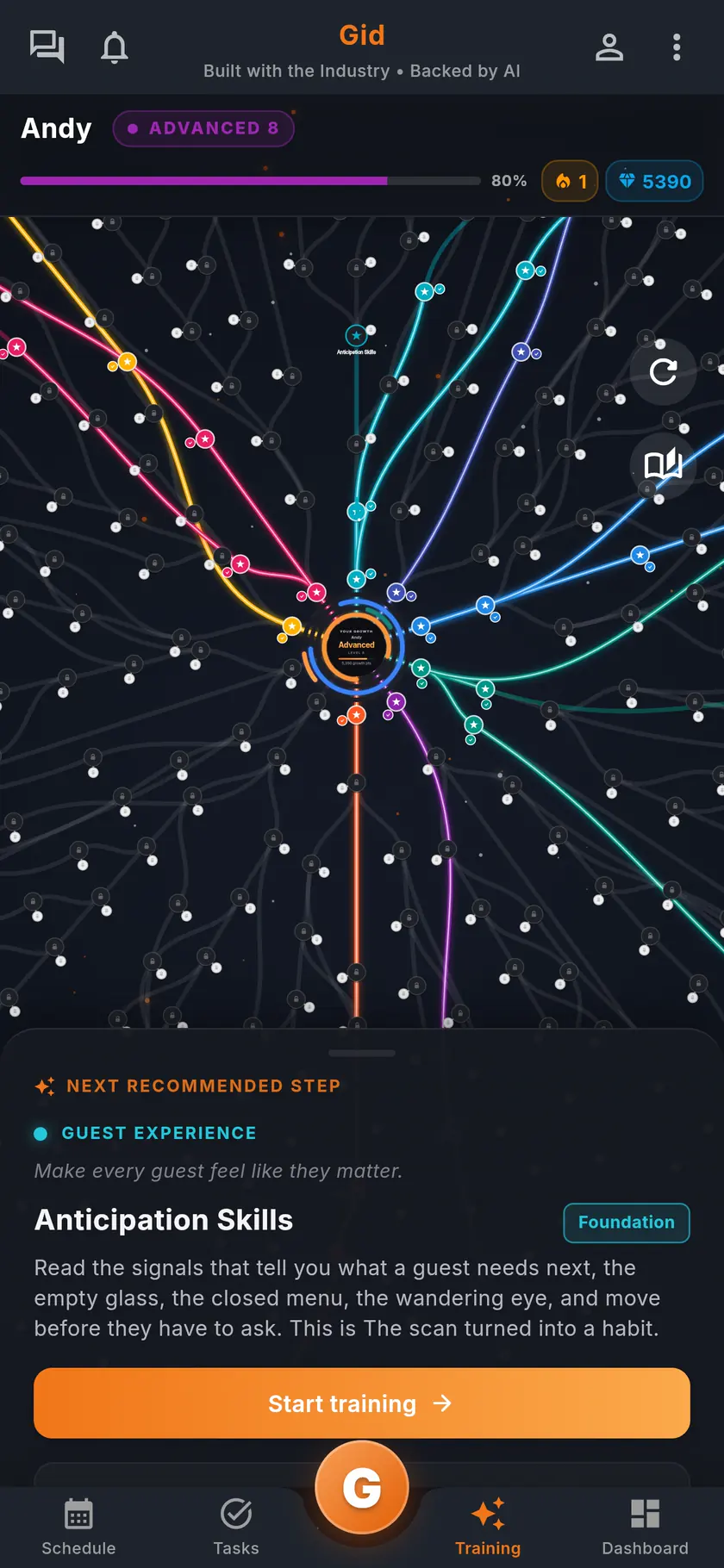
The server sees the next step
Each teammate opens My Training on the phone and finds the next recommended step under their learning map.
Step 2
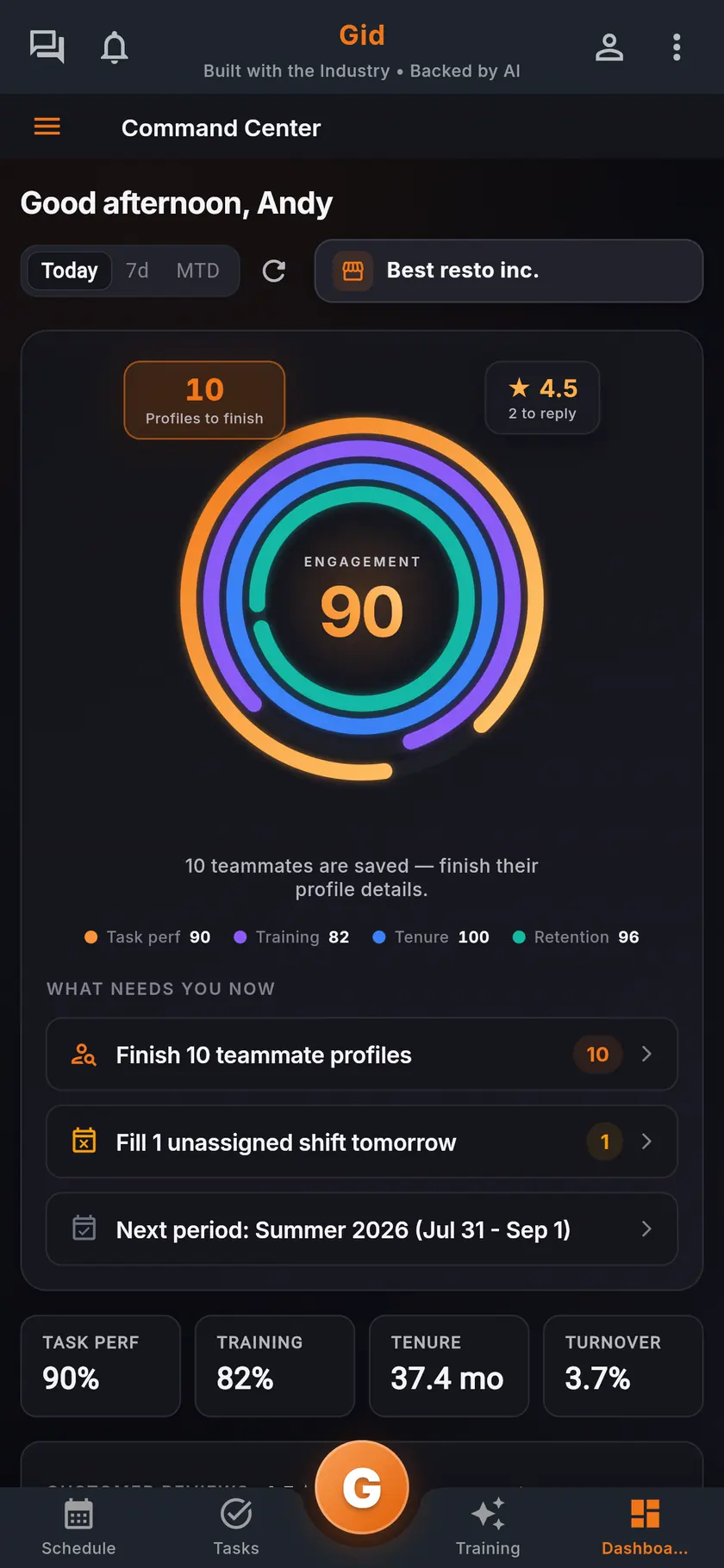
The manager sees who is ready
The command center shows the team's training beside task performance, and each training's roster names who has finished and who is overdue.
Step 3
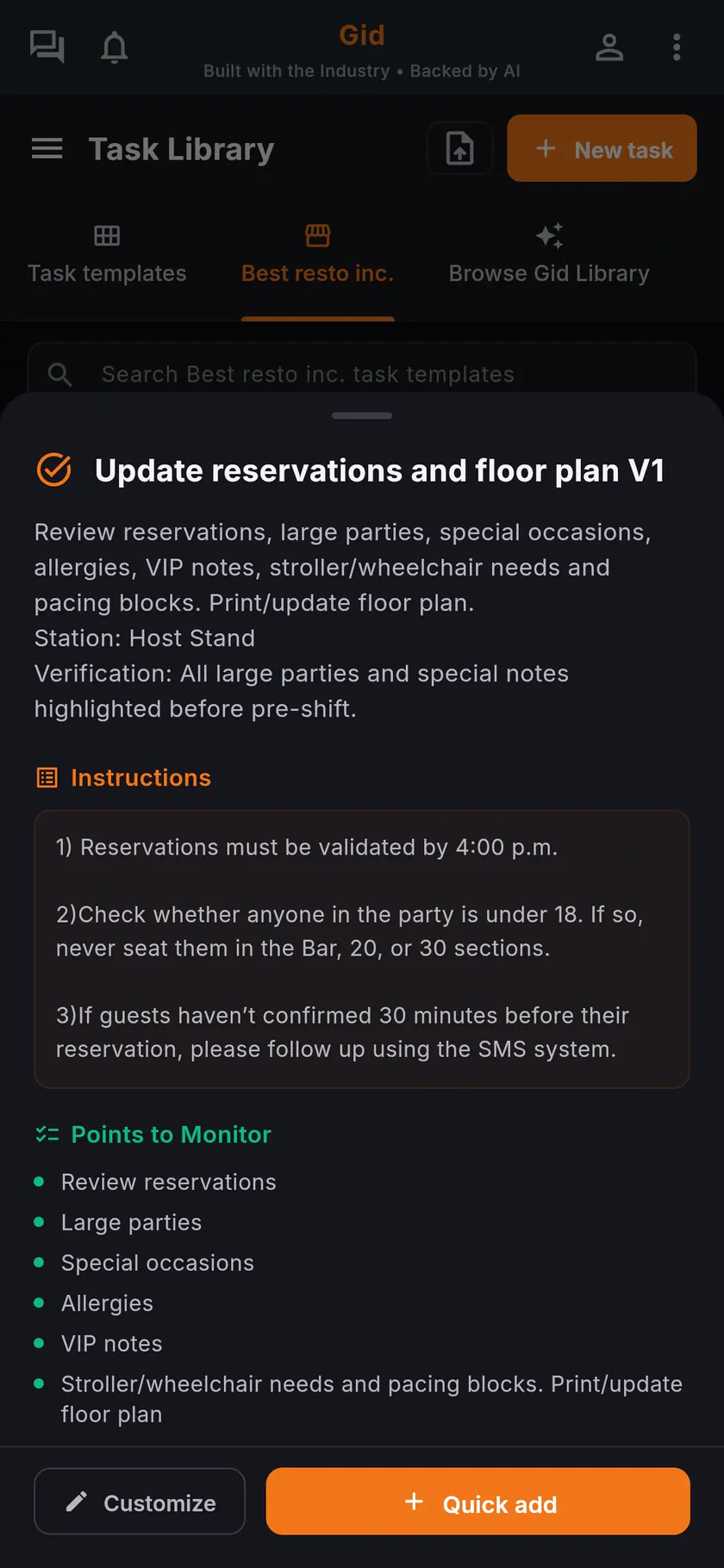
The work points to the training
Link a training to a task or a task template, so the server opens it from the task it explains.
A real service
A new special on a Friday, in Gid
An example of one menu change, taught before the doors open instead of at the table.
Thursday
The menu changes
The kitchen adds a special with a nut sauce. The manager uploads the new menu and builds a menu training from that version.
Friday, before service
Assigned to the floor
The menu trainings go to the front-of-house roles, due that day. The servers finish them on their phones before service.
During service
The allergy question has an answer
A guest asks about nuts. The server knows the answer because it was in the training, not because the cook was free.
The stack you have today
Six apps that do not talk to each other, or one that does
Nothing here is a knock on any specific tool. It is what happens when the schedule, the tasks, the training, the chat, the documents and the guest reviews were never built to know about each other.
6 apps 6 logins 6 bills
- SchedulingThe week is posted, the swaps still happen by text.
- Tasks and checklistsA missed closing task shows up the next morning.
- Onboarding and trainingNew hires learn from whoever is on shift.
- Team chatShift talk buried between personal texts.
- Documents and menusRecipes and SOPs lost in folders and binders.
- Google reviewsReplies go out, the lesson never reaches the team.

Gid
One app on iOS, Android and the web
1 app 1 login 1 price
- Scheduling
- Tasks and checklists
- Onboarding and training
- Team chat
- Documents and menus
- Google reviewsReply drafts, recurring themes, lessons for the team
$29 USD per location per monthWhole team included
First 250 worldwide • rate locked, no contract
The honest part
When a binder is enough, and what Gid does not do yet
Not every restaurant needs a training app. Here is when yours does not.
A binder and shadowing may be enough if
- You hire one server a year and train them yourself.
- Your menu rarely changes.
- Every new server works beside your best one for weeks.
Limits of Gid today
- Gid is not an accredited course provider. A certification your jurisdiction requires, such as for alcohol service, still comes from its accredited provider.
- Menu trainings start as drafts. Someone on your team checks them before they reach the servers.
- Gid POS and Gid Reservations are listed as coming soon. They are not in your hands yet, and we will not bill you for them until they are.
- The free workspace brings you plus one helper. Bringing the full team means a paid location.
Questions, answered
What should server training cover?
The room and the steps of service, the menu dish by dish with its allergens, drinks and selling, and running a section alone. The two-week plan above is a starting point you can copy.
Can I build server training from my own menu?
Yes. From a menu, Gid builds four focused front-of-house trainings for one verified menu version, as drafts you review before your team sees them.
Can I assign training to servers only?
Yes. Send a training to a department, such as front of house, or to specific people, due by a set date or by a day on the job.
How do I know who has finished a training?
Each training has a roster: you see who has completed it, who is in progress, who has not started and who is overdue.
Do servers need a computer for training?
No. Training runs in the Gid app on iOS and Android, and on the web, so it fits a few quiet minutes before service.
What does server training in Gid cost?
$29 USD per location per month at the Founders rate, $89 USD at the public rate, with your whole team included; adding people never raises your bill. The training, the schedule, the tasks and the team chat are the same app, at the same price.
About this page
Who wrote it, and what Gid is
Written by the Gid team
Members of the Gid team owned and operated restaurants before building software. The two-week plan above is free to reuse. If your team needs something it misses, tell us at contact@gidai.ca.
What Gid is
One connected operations app for restaurant teams: scheduling, tasks, team chat, continuous training, onboarding, performance evaluations and an AI assistant grounded in your own documents. One price per location, whole team included.
Make every shift lighter.
Set up your workspace and try every part of Gid on your own. When you know it earns its place, your team rides in next.
No contract. No commitment. No credit card.