Comparison • Restaurant teams
A Homebase alternative for restaurant teams.
Homebase is built for hourly teams of every kind. Gid is built for restaurants: the schedule, the tasks, the team chat, the training and the Google reviews in one app, at one price per location, with your whole team in.
No contract. No commitment. No credit card.
Our job is to earn our place on your floor, not to lock you in.
Last updated September 24, 2026
Gid
Founders rate • Lifetime$29 $89 USD per location per month
- Tasks, schedule and team chat in one app
- Continuous training tuned to your menu
- Daily reports that surface what matters
- An AI assistant that knows your documents
- Your whole team in. Adding people never raises your bill.
First 250 worldwide • rate locked, no contract
Who this is for
Three restaurants that need more than a schedule and a time clock
If one of these is your week, read on. If none of them is, Homebase may well be the better buy, and we say where below.
Restaurant work
You need the kitchen, not only the clock
Checklists with photos and readings, menu training and Google reviews are daily restaurant work. In Gid they come with the location.
A growing team
Training is the bottleneck
Getting a new server ready for a Friday is the hard part. Gid puts the training next to the schedule, assigned by department, with a roster of who has finished.
Several tools already
The tasks and the training live elsewhere
Homebase lists its Task Manager as an add-on. In Gid, tasks and training are part of the same app and the same price.
Side by side
Gid and Homebase, on the record
Every Homebase line below was read on Homebase's own pricing page on September 24, 2026. Where we could not confirm something there, the cell says "to verify" instead of guessing.
| What you are buying | Gid | Homebase |
|---|---|---|
| Published price | $29 USD per location per month at the Founders rate, $89 USD public. | Basic: free for 1 location, up to 10 employees. Essentials: $30. Plus: $70. All-in-One: $120. Each per location per month, billed monthly, in USD; billed annually, they show as $24, $56 and $96. |
| People included | Your whole team. Adding people never raises your bill. | "Up to 10" employees on Basic, "Unlimited" on Essentials, Plus and All-in-One. |
| Free plan and trial | Free workspace, no card. It brings you plus one helper; the rest of the team rides on a paid location. | "Free 14-day trial of All-in-One" and "No credit card required". Without a plan chosen at the end, the account moves to the free Basic plan. |
| Scheduling | Build the week on each person's availability and weekly hours; each person confirms their own shifts on the phone. In the Shift Marketplace, a shift can be handed to a teammate, opened to the team, covered or picked up. A direct trade of one shift for another is not available today. | "Build your weekly schedule" on every plan; "Manage availability & time off requests" and "Allow employees to trade, cover and claim open shifts" from Essentials. |
| Time clock | Clock in, start a break and clock out with Gid on the phone. | "Clock in on tablets, computers & POS Devices" on every plan; "location-based clock in with the mobile time clock" from Essentials. |
| Team chat | Included. Tasks, shifts and documents travel inside the conversation, and announcements show who read them. | "Message with your team in real-time" on every plan; "Create custom messenger channels & share announcements" and "Get confirmation when employees view schedules & read messages" from Essentials. |
| Tasks | Included. Checklists with photos, readings, sign-offs and a manager's review. | Task Manager, an add-on at "$13/month per location". |
| Training | Included. Build training from your menu, assign it by department, and see who has finished. | Not listed on its pricing page. To verify. |
| Onboarding | Invitations, a first-login setup card and a seven-day integration plan with a supervisor and a mentor. | On All-in-One: "Send onboarding packets to new-hires and contractors" and "Automate paperwork with W-4, W-9, I-9 and Direct Deposit Forms". |
| Recognition and staff reviews | The Pass, for thanks between teammates, and onboarding, quarterly, half-year and annual reviews. | From Plus: "Celebrate employee milestones & birthdays" and "Keep performance notes for employees". |
| Google reviews | Included. Reply drafts, recurring themes, lessons for the team. | Not listed on its pricing page. To verify. |
| Payroll | Not a Gid product today. | An add-on on any plan, priced at a USD 49 monthly base fee plus USD 6 per month per employee paid, with six months free shown as a limited-time offer. |
| Hiring | Not a Gid product today. Employee onboarding is included once someone is hired. | Hiring Assistant "Starting at $99/month", job post boosts "Starting at $50/post" and background checks at "$30 each". |
| HR and compliance | Not a Gid product today. Gid is not a legal advisor. | On All-in-One: "Get live support from certified HR Advisors" and "Get notified about changes to federal and state labor laws". |
| Phones | iOS and Android apps, plus the web app. | "Manage your team & stay connected on our mobile app" on every plan. |
Verified on September 24, 2026. Source, Homebase's own public pricing page: joinhomebase.com/pricing. Homebase publishes its prices in USD, like Gid, so these figures compare directly. The page offers monthly and annual billing, and the table says which is which. That day it also showed six months of free payroll and Plus plan as a "Limited time offer" with "Terms apply". Gid's own figures come from gidai.ca/#pricing and gidai.ca/founders. Anything we could not read on that page is marked "to verify" rather than filled in.
Where Gid differs
Built for the restaurant, priced per location
The work around the schedule lives with it
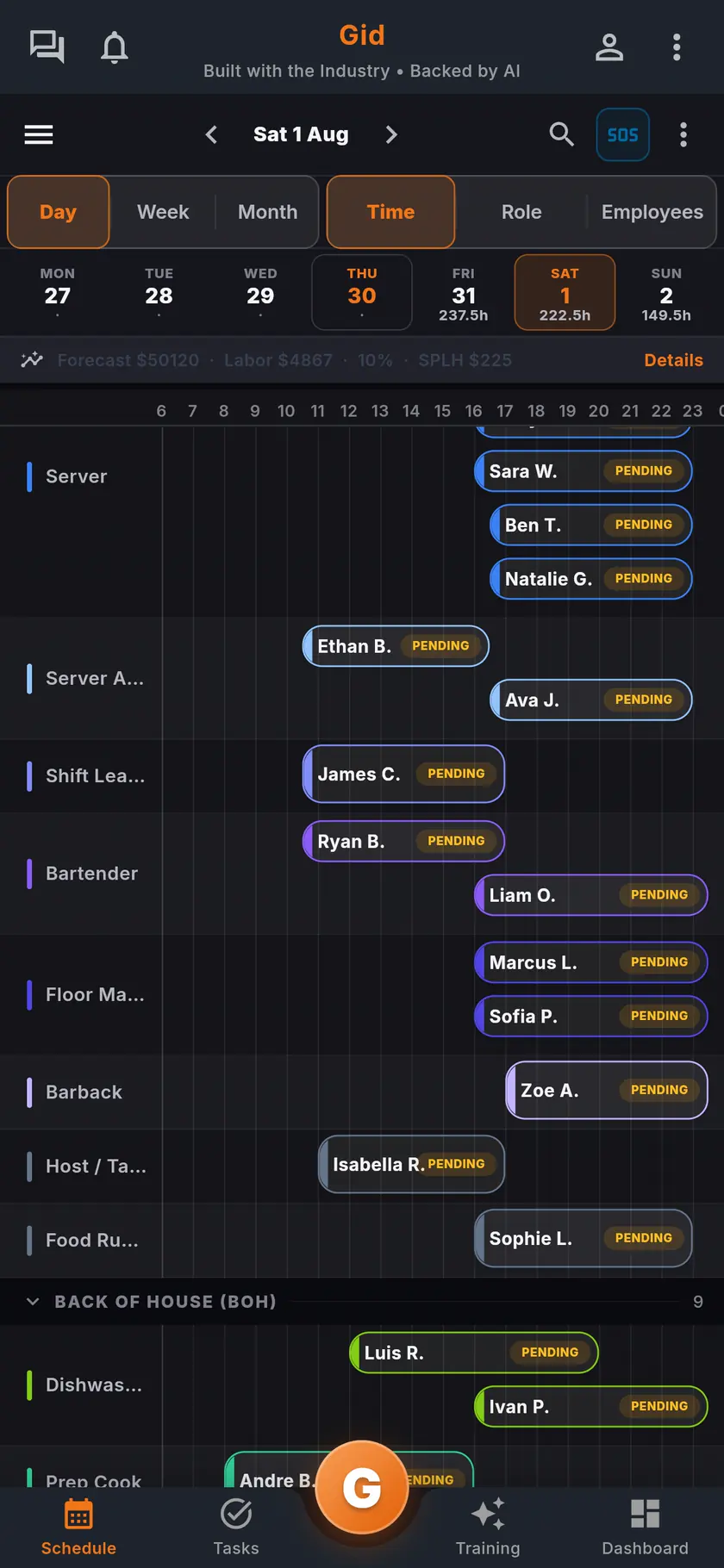
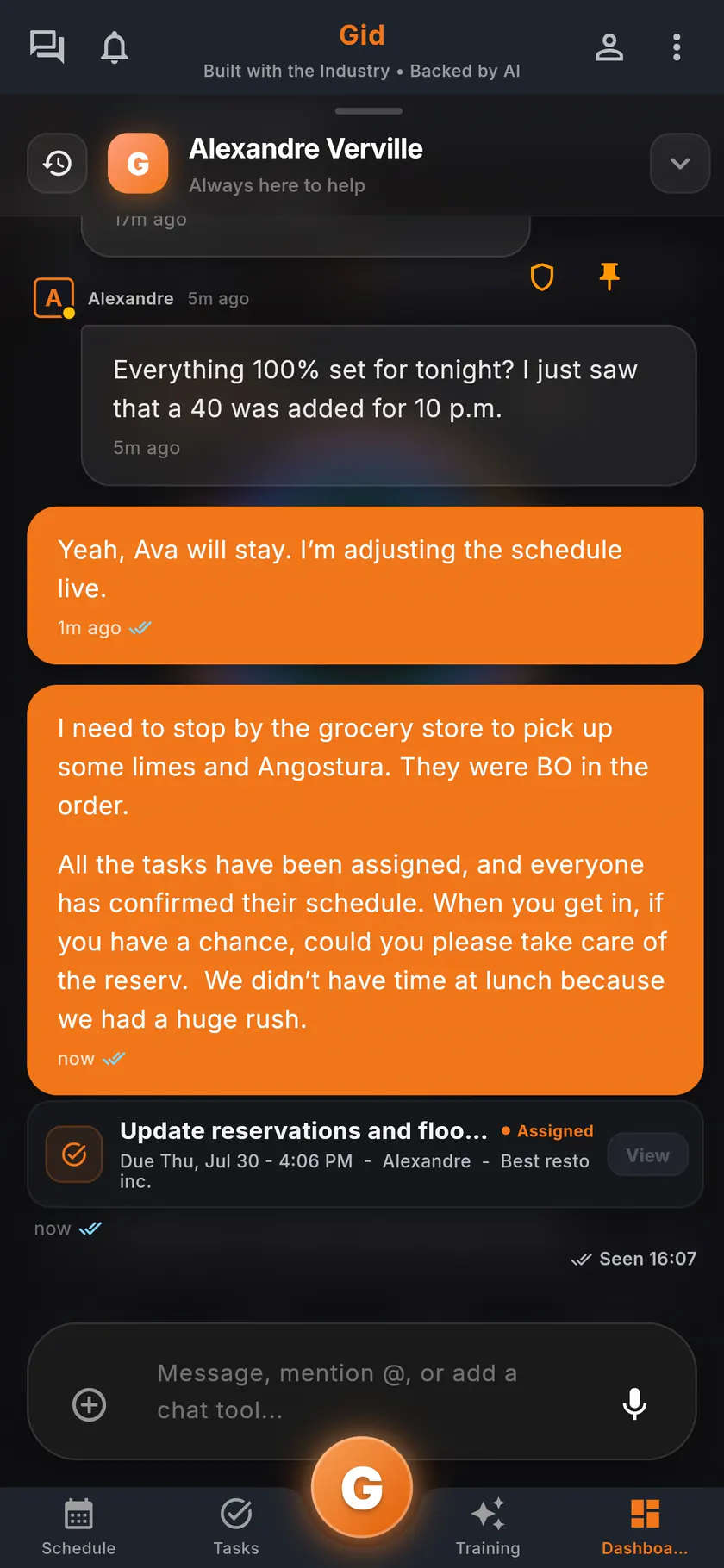
Tasks attach to shifts, reviews become tasks and training, and the chat knows the shift, on iOS, Android and the web.
One price per location, whole team in
No add-on for tasks and no separate price for training. You hire, you train, you schedule, and the bill stays where it was.
Training that is part of the job
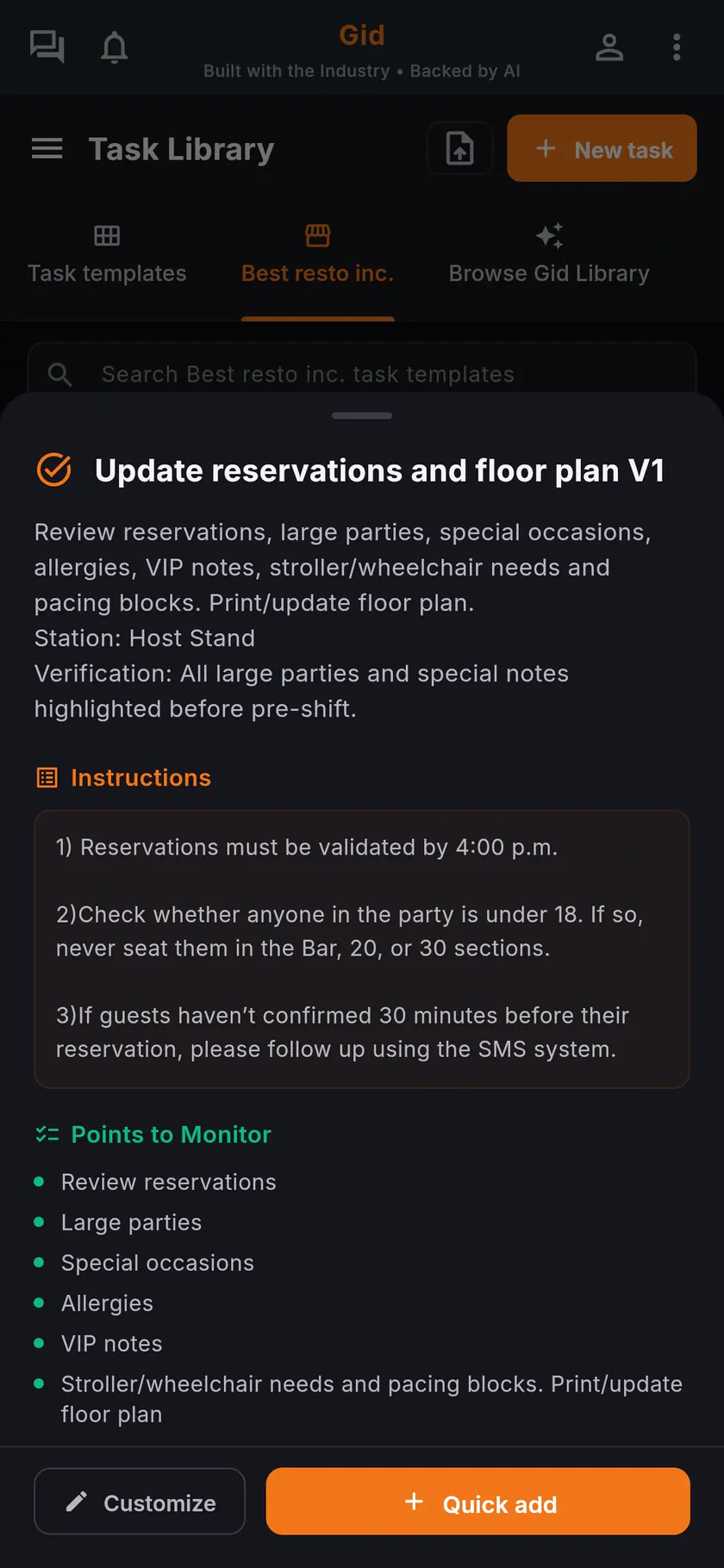
Build training from your menu or start from the Gid Library, assign it by department, and see who has finished.
Founders write the roadmap
250 operations worldwide lock the Founders rate for as long as they run on Gid. When what you need is useful and responsible, our team ships it free of charge. See what shipped this week in the changelog.
The stack you have today
Six apps that do not talk to each other, or one that does
Nothing here is a knock on any specific tool. It is what happens when the schedule, the tasks, the training, the chat, the documents and the guest reviews were never built to know about each other.
6 apps 6 logins 6 bills
- SchedulingThe week is posted, the swaps still happen by text.
- Tasks and checklistsA missed closing task shows up the next morning.
- Onboarding and trainingNew hires learn from whoever is on shift.
- Team chatShift talk buried between personal texts.
- Documents and menusRecipes and SOPs lost in folders and binders.
- Google reviewsReplies go out, the lesson never reaches the team.

Gid
One app on iOS, Android and the web
1 app 1 login 1 price
- Scheduling
- Tasks and checklists
- Onboarding and training
- Team chat
- Documents and menus
- Google reviewsReply drafts, recurring themes, lessons for the team
$29 USD per location per monthWhole team included
First 250 worldwide • rate locked, no contract
Switching
How to try Gid without betting the schedule on it
Nobody should move a live restaurant onto a new tool in one Sunday. Four steps, in this order.
Step 1
Open a workspace, keep your current tool running
No card, no commitment. You are not cancelling anything yet. Set it up on your own and look at it with a manager's eyes.
Step 2
Start with the tasks and the training
They are where Gid differs most. Run your opening and closing lists and one training in Gid while the schedule stays where it is.
Step 3
Bring one location and one week
Rebuild next week's schedule in Gid next to the one you already have. Publish it to two or three people who will tell you the truth.
Step 4
Move the team when it has earned it
When the schedule, the tasks and the chat run in Gid, bring the rest of the team. If Gid has not earned its place on your floor, close the workspace. Cancel anytime.
In the app
What your team actually looks at
The honest part
Where Homebase may be the stronger fit, and what Gid does not do yet
A comparison page that only flatters the vendor who wrote it is worth nothing. Here is the side of the ledger that costs us signups.
Pick Homebase if
- You want payroll inside the same tool. Homebase lists a payroll add-on; Gid has no payroll product.
- You want employees to trade one shift for another directly. Homebase lists shift trades; in Gid, a direct trade of one shift for another is not available today.
- You want hiring in the same place: job posts, a hiring assistant and background checks.
- You want new-hire paperwork such as W-4 and I-9 forms, and live support from HR advisors.
- You are one location with up to 10 employees and free is the entire budget. Homebase's Basic plan is free at that size.
- You run a business other than a restaurant. Homebase is built for hourly teams of every kind.
Limits of Gid today
- Gid POS and Gid Reservations are listed as coming soon. They are not in your hands yet, and we will not bill you for them until they are.
- Gid is not SOC 2 audited and not ISO/IEC 27001 certified. We use relevant practices from those frameworks as references; our providers' certifications cover their services, not Gid as a company. See our exact security status.
- The Founders Programme is deliberately small: 250 operations worldwide, onboarded personally. That is a promise about attention, and also a queue.
- The free workspace brings you plus one helper. Bringing the full team means a paid location.
- No payroll and no applicant tracking today.
Questions, answered
Is Gid a drop-in replacement for Homebase?
For the schedule, the time clock, the team chat and the tasks, yes. For payroll, hiring and HR paperwork, no. Those are not Gid products today, and we would rather you know that before you sign up than after.
What does Gid cost next to Homebase?
Gid is $29 USD per location per month at the Founders rate, $89 USD at the public rate, with your whole team included.
On its own pricing page, read September 24, 2026, Homebase lists a free Basic plan for 1 location up to 10 employees, then Essentials at $30, Plus at $70 and All-in-One at $120 USD per location per month billed monthly, or $24, $56 and $96 billed annually. Its Task Manager is an add-on at $13 per month per location.
Can I try Gid without a credit card?
Yes. Create a workspace and try every part of Gid on your own. No card, no commitment, cancel anytime. The free workspace brings you plus one helper; the rest of the team rides on a paid location.
Does Gid run payroll like Homebase?
No. Gid has a time clock, but payroll is not a Gid product today. Homebase lists payroll as an add-on on its pricing page.
Does my team need a computer to use Gid?
No. Gid runs on iOS, Android and the web, so the schedule, the tasks and the training live in the pocket of everyone at work. Nothing depends on the office computer.
Make every shift lighter.
Set up your workspace and try every part of Gid on your own. When you know it earns its place, your team rides in next.
No contract. No commitment. No credit card.