Restaurant operations • All in one
An all-in-one restaurant employee app, instead of six.
The schedule in one app, the tasks on a whiteboard, the training in a binder and the team in a group chat. Gid puts all of it in one app your team already carries, at one price per location.
No contract. No commitment. No credit card.
Our job is to earn our place on your floor, not to lock you in.
Last updated September 24, 2026
Gid
Founders rate • Lifetime$29 $89 USD per location per month
- Tasks, schedule and team chat in one app
- Continuous training tuned to your menu
- Daily reports that surface what matters
- An AI assistant that knows your documents
- Your whole team in. Adding people never raises your bill.
First 250 worldwide • rate locked, no contract
Six fast answers
What to know before you replace your stack
Six questions, six straight answers.
Price and next step
$29 USD per location, whole team in
The Founders rate is $29 USD per location per month, $89 public; adding people never raises the bill. Try a free workspace first, no card.
The problem
Six apps, six logins, nothing connected
The schedule does not know the tasks, the chat does not know the schedule, and the training is somewhere nobody opens on a Tuesday.
What connects
The work knows the rest of the work
A shift carries its tasks, a Google review becomes a task and a lesson, and a task links to the training that explains it.
What you see
One phone, the whole restaurant
The week, the day's tasks, the team chat, the next training and the reviews waiting for a reply, in one app on iOS, Android and the web.
What it replaces
The six categories of the usual stack
Scheduling, tasks and checklists, onboarding and training, team chat, documents and menus, and Google reviews.
Limits today
What Gid does not do yet
Gid POS and Gid Reservations are coming soon, billed only once turned on. No payroll and no applicant tracking today.
Where each app lives in Gid
The six categories, one by one
The same six categories as the stack below, and what each becomes in Gid.
| What you use today | In Gid |
|---|---|
| Scheduling | Build the week on each person's availability and weekly hours; each person confirms their own shifts on the phone, and open shifts go to the Shift Marketplace. |
| Tasks and checklists | Tasks with an owner, a due time and proof: photos, readings checked against a safe range, signatures and a manager's review. |
| Onboarding and training | Invitations, a seven-day integration plan with a supervisor and a mentor, and training built from your menu with a completion roster. |
| Team chat | Team channels, direct messages and announcements that show who read them, with tasks and shifts inside the conversation. |
| Documents and menus | Procedures, recipe cards and menus, each open to the right people, and Gid answers the team's questions from them. |
| Google reviews | Reply drafts, recurring themes, lessons for the team. |
How it works in Gid
Why one app is more than six apps in one icon
Three connections that separate apps cannot make.
Step 1
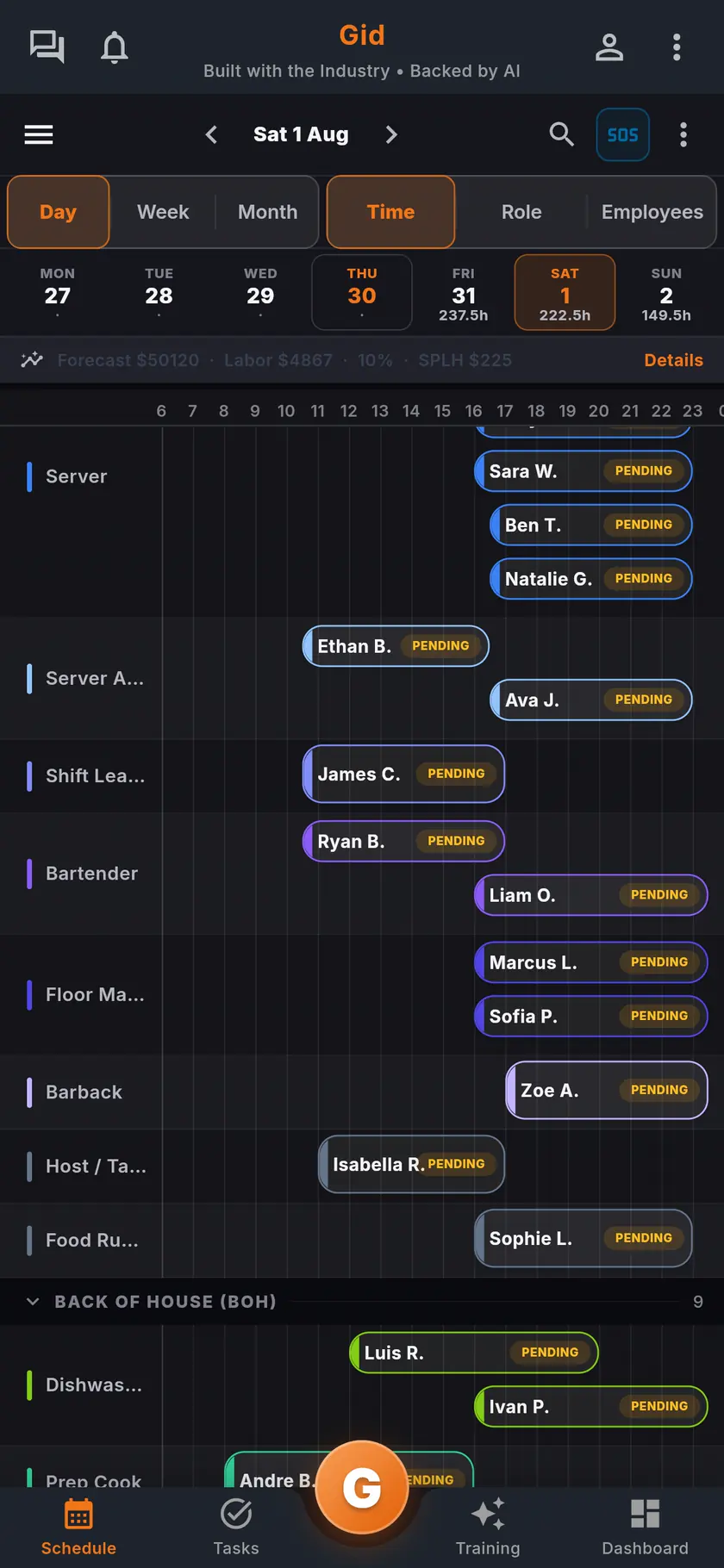
A shift carries its tasks
Attach tasks to a shift when you create it. If the shift is given away or covered in the Shift Marketplace, its open tasks move to whoever takes it.
Step 2
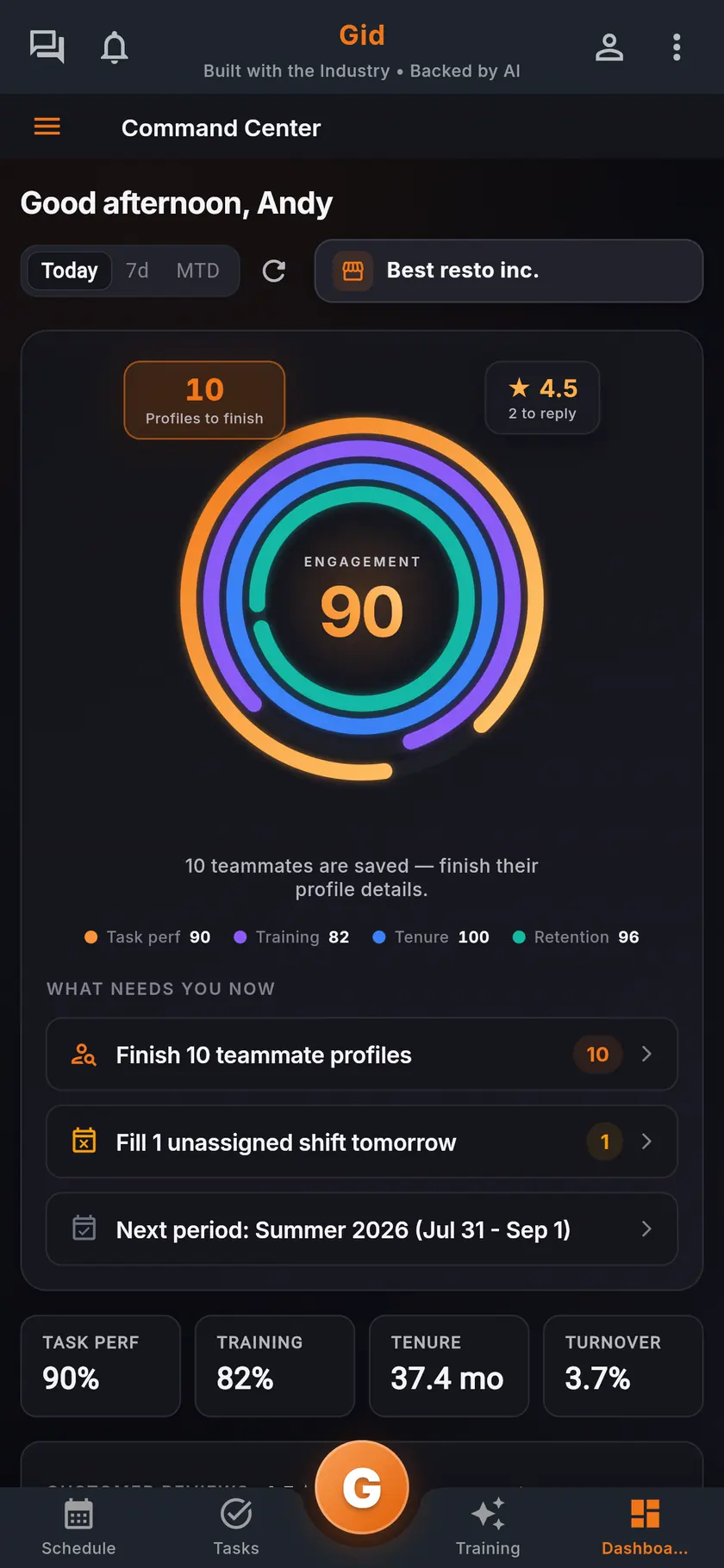
A review becomes the next fix
Create a task from a Google review, and link the review to a training as a real example.
Step 3
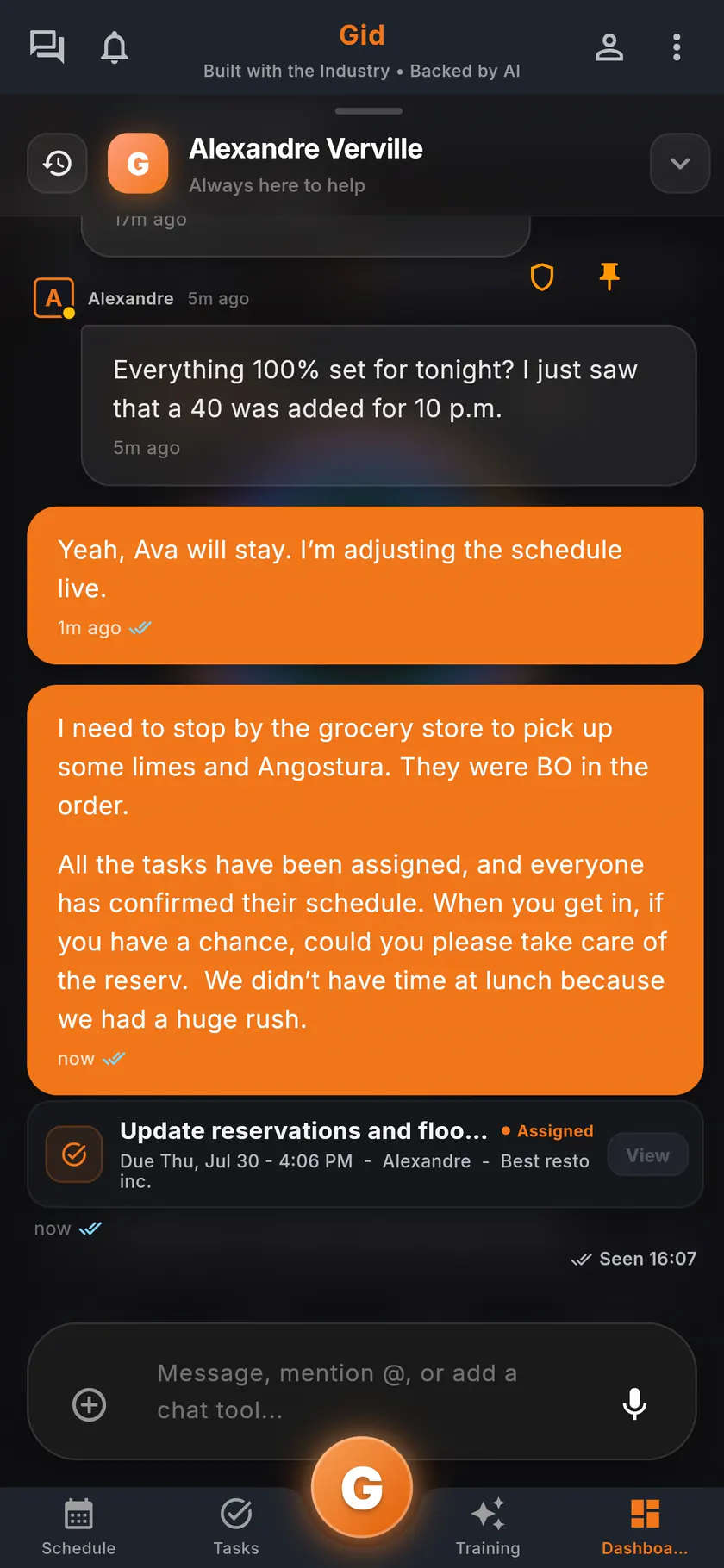
The chat knows the work
Link a task, a shift or a document into any conversation, and the task's status travels with it.
The stack you have today
Six apps that do not talk to each other, or one that does
Nothing here is a knock on any specific tool. It is what happens when the schedule, the tasks, the training, the chat, the documents and the guest reviews were never built to know about each other.
6 apps 6 logins 6 bills
- SchedulingThe week is posted, the swaps still happen by text.
- Tasks and checklistsA missed closing task shows up the next morning.
- Onboarding and trainingNew hires learn from whoever is on shift.
- Team chatShift talk buried between personal texts.
- Documents and menusRecipes and SOPs lost in folders and binders.
- Google reviewsReplies go out, the lesson never reaches the team.

Gid
One app on iOS, Android and the web
1 app 1 login 1 price
- Scheduling
- Tasks and checklists
- Onboarding and training
- Team chat
- Documents and menus
- Google reviewsReply drafts, recurring themes, lessons for the team
$29 USD per location per monthWhole team included
First 250 worldwide • rate locked, no contract
Switching
How to move from six apps to one without a bad week
Nobody should move a live restaurant onto a new tool in one Sunday. Four steps, in this order.
Step 1
Open a workspace, keep your current apps
No card, no commitment. You are not cancelling anything yet. Set it up on your own and look at it with a manager's eyes.
Step 2
Bring your documents and your menu
Upload your procedures, recipe cards and menus, and build a first training from your menu.
Step 3
Run one location for one week
Rebuild next week's schedule and the opening and closing lists in Gid, next to what you use today.
Step 4
Retire an app only when Gid has replaced it
Move the team one category at a time. If Gid has not earned its place on your floor, close the workspace. Cancel anytime.
The honest part
When separate apps are the right call, and what Gid does not do yet
One app is not always better. Here is when yours should stay separate.
Separate apps may be right if
- One of your apps does something Gid does not, such as payroll, and you need it every week.
- Your apps already share their data and everyone uses them.
- Your whole team is two people and a notebook.
Limits of Gid today
- No payroll and no applicant tracking today.
- Gid does not connect to wireless temperature probes or label printers today.
- Gid POS and Gid Reservations are listed as coming soon. They are not in your hands yet, and we will not bill you for them until they are.
- The free workspace brings you plus one helper. Bringing the full team means a paid location.
Questions, answered
What is an all-in-one restaurant employee app?
One app for the work a restaurant team shares: the schedule, the tasks and checklists, onboarding and training, the team chat, the documents and menus, and the Google reviews, with one login for everyone.
Which apps can Gid replace?
The six categories above: scheduling, tasks and checklists, onboarding and training, team chat, documents and menus, and Google reviews. Not payroll or applicant tracking, which are not Gid products today.
Is one app cheaper than six?
It depends on what you pay today. Gid is $29 USD per location per month at the Founders rate, $89 USD public, with your whole team included, for the six categories above.
Does the whole team need a computer?
No. Gid runs on iOS, Android and the web, so every part of it is on the phone of everyone at work.
Can I move one part at a time?
Yes. Start with one location and one category, such as the opening and closing lists, and retire the old app only when Gid has replaced it.
About this page
Who wrote it, and what Gid is
Written by the Gid team
Members of the Gid team owned and operated restaurants before building software. The six-category map above is free to reuse. If your team needs something it misses, tell us at contact@gidai.ca.
What Gid is
One connected operations app for restaurant teams: scheduling, tasks, team chat, continuous training, onboarding, performance evaluations and an AI assistant grounded in your own documents. One price per location, whole team included.
Make every shift lighter.
Set up your workspace and try every part of Gid on your own. When you know it earns its place, your team rides in next.
No contract. No commitment. No credit card.